AI-generated action items for construction projects: 2026 guide
Discover how AI-generated action items are revolutionising site meetings by automatically extracting tasks with assigned owners and concrete deadlines.
By James Shorter ·
AI-generated action items for construction projects: 2026 guide

TL;DR:
- AI-generated action items automatically extract tasks with assigned owners, specific deliverables, and deadlines from meetings. Human review and structured workflows are essential for ensuring accuracy and completion in construction projects. Using AI tools like Granola and Spinach streamlines task tracking and improves accountability on site.
AI-generated action items are tasks automatically extracted by artificial intelligence from meeting transcripts, conversations, or project discussions, each carrying a named owner, a specific deliverable, and a concrete deadline. Construction project managers searching for what are AI-generated action items will find the concept sits at the intersection of automated task generation and traditional project accountability. Tools like Granola and Spinach now do this extraction in real time, turning spoken commitments into trackable records. For construction teams juggling subcontractors, RFIs, and site diaries, this shift from manual note-taking to AI-driven task capture is a direct answer to one of the industry’s oldest problems: things agreed in meetings that never get done.
What are AI-generated action items and why do they matter on site?
AI-generated action items are defined as tasks with three mandatory components: a single named owner, a specific deliverable, and a concrete deadline. Without all three, the output is a note, not an action item. This distinction matters enormously on a construction site, where a vague instruction like “sort out the drainage issue” can sit unresolved for weeks because nobody knows who owns it or when it must be finished.

The industry term for this concept is “meeting action items” or simply “action items.” The AI-generated variant refers specifically to tasks identified and formatted by an AI tool rather than a human minute-taker. The core standard is identical: owner, deliverable, deadline. The difference is speed and consistency. A human note-taker misses things, especially in fast-moving site meetings. An AI tool captures every commitment made.
A well-formed action item always begins with a verb and clearly states what is to be done, who will do it, and by when. This verb-led structure is what separates an action item from a discussion point or a general observation. For construction project managers, this means every task that leaves a meeting has a clear owner and a date attached to it, which is the foundation of accountability on any project.
What mandatory elements make an AI-extracted action item valid?
Three elements make an action item valid and trackable. Miss any one of them and the task becomes ambiguous, and ambiguous tasks do not get completed.
- Owner: A single named individual, not a team or a company. “The M&E contractor” is not an owner. “Dave Patel, M&E lead” is.
- Deliverable: A specific, verb-led task. “Review the drawings” is weak. “Review revised structural drawings and confirm steel specification” is precise.
- Deadline: A concrete date, not “soon” or “ASAP.” “By Friday 13th June” is a deadline. “End of week” is not.
The difference between an action item and a note is specificity. Notes record what was discussed. Action items record what will be done, by whom, and when. On a construction project, this distinction directly affects whether a subcontractor turns up with the right materials or whether a variation gets logged before it becomes a dispute.
Pro Tip: When reviewing AI-generated outputs from site meetings, check the deliverable column first. If the task does not start with a verb, it has not been properly extracted and needs rewriting before it enters your task tracker.
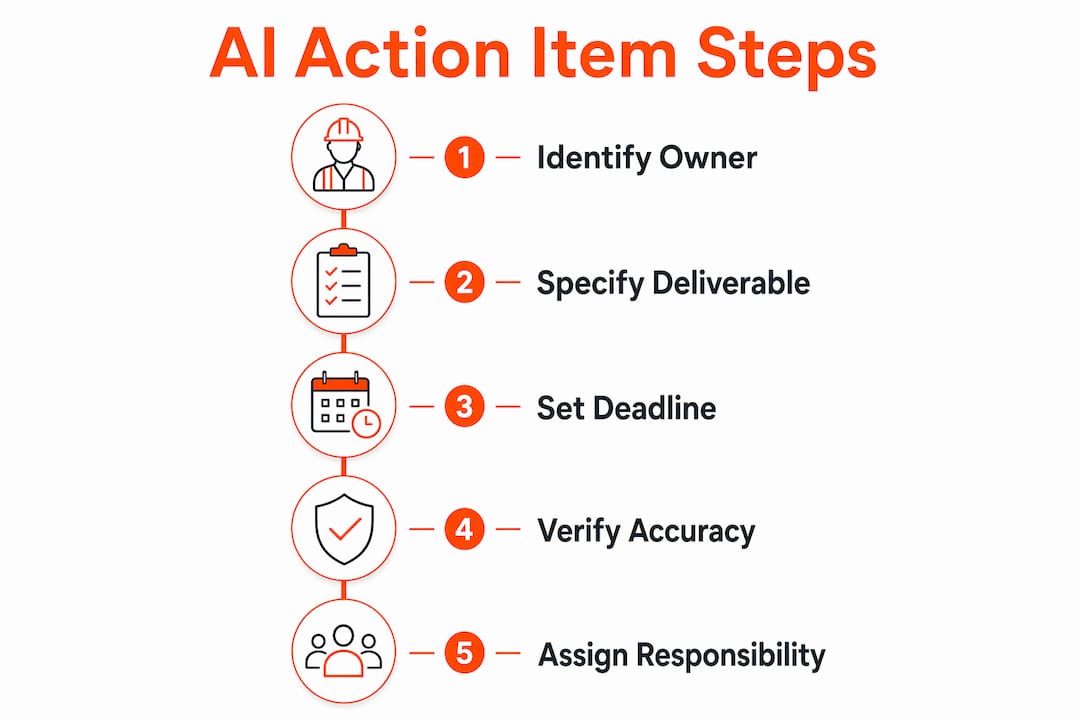
Construction-specific examples of valid action items include: “Sarah Chen, site manager, to submit revised programme to the client by 5pm on Wednesday 18th June” or “Tom Walsh, groundworks foreman, to confirm concrete pour date with structural engineer by noon on Monday 16th June.” Both have an owner, a deliverable, and a deadline. Both are trackable. You can find a deeper breakdown of action item components in the BRCKS project guide.
How do AI tools extract action items from meeting transcripts?
The extraction process follows a clear sequence, and understanding it helps construction project managers get better outputs from whichever tool they use.
- Transcript capture: The AI records or receives a transcript of the meeting, either from a live audio feed or an uploaded recording. Tools like Granola capture audio locally without announcing themselves or altering the participant list, which preserves the natural flow of a site meeting.
- Extraction via prompt engineering: The AI scans the transcript for commitments, assignments, and deadlines. Prompt engineering compels the AI to include source quotes or timestamps for each extracted item, which prevents hallucinations and gives reviewers a way to verify every task against the original conversation.
- Ambiguity handling: When the AI cannot identify a clear owner or deadline, best practice is to mark the item as unassigned or flag it as ambiguous rather than guessing. This prevents inaccurate task lists from entering your project management system.
- Human review: A team member reviews the extracted list, assigns any unresolved owners, confirms deadlines, and approves the final record. This human-in-the-loop step is not optional.
- Sync to project tools: The verified list pushes into your project management software, where tasks become trackable items with owners and due dates.
Pro Tip: Ask your AI tool to include the verbatim quote from the transcript next to each extracted action item. If the quote does not support the task, the extraction is wrong. This single check eliminates most AI errors before they reach your team.
Free AI models handle one-off 60-minute meeting transcripts effectively. Recurring site meetings with multiple workstreams benefit from dedicated AI notetakers that integrate directly with project management software, reducing the manual effort of copying tasks between systems.
What are typical AI action item examples in construction meetings?
The clearest way to understand AI-generated action items is to compare weak outputs with well-formed ones. The table below shows the difference between vague phrasing and properly structured tasks in a construction context.
| Vague phrasing | Well-formed AI action item |
|---|---|
| “Someone needs to chase the structural engineer.” | “Mark Davies, project manager, to chase structural engineer for revised load calculations by 5pm Friday 20th June.” |
| “The drainage drawings need updating.” | “Priya Sharma, civil engineer, to update drainage layout drawings to reflect revised site levels by Wednesday 25th June.” |
| “We should sort the variation for the extra groundworks.” | “James O’Brien, QS, to submit variation order for additional groundworks to client for approval by noon Monday 23rd June.” |
| “Someone to confirm the scaffold strike date.” | “Lee Hutchins, site manager, to confirm scaffold strike date with scaffold contractor and notify site team by Tuesday 17th June.” |
Replacing vague phrasing with specific, verb-led instructions is the single biggest factor in whether AI-generated tasks actually get completed. The consequence of ambiguous phrasing on a construction project is not just an incomplete task list. It is a missed deadline, a disputed variation, or a subcontractor arriving on site without the right information.
AI tools that reference transcript context add another layer of value. When a task includes a note such as “extracted from minute 14:32 — ‘Mark, can you chase the structural engineer about those load calcs before Friday?’”, the owner cannot claim they were not assigned the task. The transcript is the evidence.
What are the benefits and challenges of AI-generated action items in construction?
The benefits of AI-generated action items in construction project management are concrete and measurable.
- Reduced manual effort: AI meeting assistants like Spinach auto-file action items into project management tools such as Jira, Asana, and Trello, cutting the time spent on manual data entry after every meeting.
- Improved accountability: Every task has a named owner and a date. There is no room for “I didn’t know that was my job.”
- Communication transparency:trong> The full team sees the same task list, extracted from the same transcript. Disputes about who agreed to what become rare.
- Faster follow-up: Project managers spend less time chasing updates because the system tracks task status automatically.
The challenges are equally real and must not be ignored.
- AI hallucinations: An AI can invent an owner or a deadline that was never stated. Human oversight is indispensable because AI cannot reliably assign owners or deadlines without error.
- Missing data: If a commitment is made informally or off-transcript, the AI will not capture it.
- Ambiguity: Construction meetings often involve conditional commitments. “We’ll confirm the pour date once the weather clears” is not an action item. An AI that treats it as one creates noise in your task list.
The practical answer to these challenges is a structured workflow. AI suggests. Humans verify. The 48-hour correction window is the most effective mechanism: team members have 48 hours to dispute or clarify any AI-generated task before it becomes an official project record. This single rule converts a draft list into a binding commitment log.
For construction project managers tracking tasks across multiple sites, AI task tracking integrated with your existing reporting tools is the most practical path to consistent follow-through.
How to implement AI-generated action item workflows in construction projects
A clear implementation process prevents the most common failures: unverified AI outputs, missing owners, and tasks that never sync to the right system.
- Establish meeting protocols: Label every meeting transcript with the project name, date, and attendees before feeding it to an AI tool. This metadata makes extracted tasks traceable and prevents cross-project confusion.
- Assign a dedicated reviewer: One named person reviews every AI-generated task list before it enters the project management system. This is not a group responsibility. It belongs to one person per meeting.
- Apply the 48-hour rule: Set a correction window of 48 hours after the AI output is shared. Any task not disputed within that window becomes an official record. This creates urgency and prevents tasks from drifting.
- Sync with your project management tools: Use AI tools that connect directly to your existing software. Spinach integrates with Jira, Asana, and Trello. BRCKS captures project communications and generates structured records automatically, reducing the gap between what is discussed and what is tracked.
- Train your team on verb-led phrasing: The AI extracts what it hears. If your team says “we need to sort the drainage,” the AI produces a vague task. If they say “Priya to update drainage drawings by Wednesday,” the AI produces a valid action item. A 30-minute briefing on precise language pays back immediately.
Pro Tip: Run a pilot on a single project for two weeks before rolling out AI action item workflows across your whole portfolio. Use the pilot to identify which meeting types produce the cleanest extractions and which need more human editing.
Good meeting management practices for UK contractors make AI extraction significantly more accurate. The cleaner the meeting, the cleaner the output.
Key takeaways
AI-generated action items require a named owner, a specific deliverable, and a concrete deadline to be valid. Without all three, the task is a note, not a commitment.
| Point | Details |
|---|---|
| Three mandatory components | Every AI-generated action item needs an owner, a deliverable, and a deadline to be trackable. |
| Human review is non-negotiable | AI flags ambiguous items as unassigned. A named reviewer must verify every list before it becomes a project record. |
| The 48-hour rule converts drafts to records | Teams have 48 hours to dispute AI-generated tasks. Silence confirms the commitment. |
| Verb-led phrasing improves extraction | Training teams to speak in precise, verb-led sentences produces cleaner AI outputs with fewer errors. |
| Integration reduces manual effort | AI tools that sync with project management software cut data entry and prevent tasks from falling through the gaps. |
Why AI action items are only as good as the process behind them
I have watched construction teams adopt AI meeting tools with genuine enthusiasm, only to abandon them within a month. The reason is almost always the same: they treated the AI output as a finished product rather than a first draft.
The tools themselves are genuinely useful. Granola’s approach of capturing audio without disrupting the meeting is exactly right for construction. Site meetings are tense enough without someone announcing that a bot is listening. Spinach’s ability to push tasks directly into Jira or Asana removes a real friction point. These are not gimmicks.
The problem is the expectation gap. Project managers assume AI will do the full job. It will not. AI is excellent at spotting commitments in a transcript. It is unreliable at knowing whether “Dave” means Dave Patel or Dave Walsh, or whether “by the end of the week” means Friday or the following Monday. Those gaps require a human who knows the project.
The teams I have seen get the most value from AI-generated action items are the ones who treat the AI as a first-pass tool and build a tight review process around it. They assign one reviewer per meeting. They use the 48-hour window. They train their teams to speak in clear, verb-led sentences. The AI handles the volume. The human handles the judgement.
Construction project management is moving towards greater automation. AI-generated task extraction is one of the more practical applications available right now, not a future promise. The project managers who build good habits around it in 2026 will have a measurable advantage over those who wait.
— James
How BRCKS fits into your AI task management workflow
Construction project managers who want AI-generated action items to actually land in the right place need a system that connects communication to task tracking without adding more admin.

BRCKS is built for exactly this. It captures project communications in real time, generates structured records automatically, and gives your team a single place to track what was agreed and what has been done. For builders managing multiple subcontractors and site meetings, the BRCKS platform for builders removes the gap between what is discussed on site and what appears in your project records. Electricians managing their own project workflows can explore the BRCKS electricians solution for a tailored fit. Get BRCKS free for 14 days and see how much manual effort disappears in the first week.
FAQ
What are AI-generated action items?
AI-generated action items are tasks automatically extracted from meeting transcripts by an AI tool, each containing a named owner, a specific deliverable, and a concrete deadline. They differ from notes because they assign clear responsibility and a completion date.
How do you generate action items with AI?
Feed a meeting transcript into an AI tool such as Granola or Spinach, and the tool identifies commitments, assigns owners, and sets deadlines. Human review of the output is required before tasks enter your project management system.
What makes an AI action item different from a meeting note?
A meeting note records what was discussed. An AI action item records what will be done, by whom, and by when, always starting with a verb and naming a single responsible individual.
Can AI get action items wrong?
Yes. AI can hallucinate owners or deadlines that were never stated. Best practice is to flag ambiguous items as unassigned and apply a 48-hour correction window so team members can verify or dispute tasks before they become official records.
Which AI tools extract action items for construction meetings?
Granola and Spinach are two widely used AI meeting assistants that extract action items from transcripts. Spinach integrates directly with project management tools such as Jira, Asana, and Trello to reduce manual data entry.
Recommended
- What is an Action Item in Projects? | Construction Guide
- UK Construction Project Coordination Best Practices 2026 | BRCKS
- Construction Task Tracking: A UK Project Manager’s Guide
- Remote Construction Management: Best Practices for Success
How BRCKS Can Help
As the construction industry moves towards a more automated future, adopting AI-driven action items will be essential for maintaining a competitive edge and ensuring site safety. BRCKS simplifies this transition by integrating intelligent task management directly into your project workflow, reducing administrative overhead and preventing critical details from falling through the cracks. By centralising your data within our platform, you can turn complex site conversations into clear, accountable results. We invite you to explore how BRCKS can streamline your project delivery and help your team achieve greater precision on every build. Learn more at BRCKS and explore our full feature set.