Definition of unified communication for construction teams
Explore how unified communication integrates voice, video, and messaging into a single platform to eliminate information silos and reduce costly construction errors.
By James Shorter ·
Definition of unified communication for construction teams

TL;DR:
- Unified communication combines voice, video, messaging, and email into one platform to improve team collaboration. It reduces delays, rework, and information silos in construction projects by enabling real-time coordination among distributed teams. Proper adoption requires cultural change, training, and choosing the right deployment model.
Unified communication (UC) is defined as the integration of voice, video, instant messaging, email, and collaboration tools into a single platform to reduce friction and improve team coordination. In construction, where project managers, site supervisors, and subcontractors rarely share the same physical space, the definition of unified communication is not just a technology concept. It is a direct answer to the fragmented, error-prone communication that causes delays, rework, and budget overruns. Platforms like Zoom Workplace and Nextiva represent the modern standard for UC delivery, and cloud-based UCaaS (Unified Communications as a Service) models are making these tools accessible to construction businesses of every size.
What is the definition of unified communication?
Unified communication is a technology framework that combines voice, video, messaging, email, and collaboration tools into one cohesive user interface. The goal is to reduce the time and effort lost when teams switch between separate apps to get work done.

The industry term most widely used is “unified communications” or UC. You may also encounter UCaaS, which refers specifically to cloud-delivered UC. Both terms describe the same underlying concept: one platform, many communication methods, zero duplication.
A critical distinction worth understanding is the difference between unified communication and unified messaging. Unified messaging consolidates only non-real-time messages, such as voicemail, email, and fax. UC goes further by integrating real-time tools like voice calls and video conferencing alongside those asynchronous channels. For construction teams managing live site decisions, that real-time capability is the part that matters most.
What are the core components of unified communication systems?
UC platforms bring together several distinct communication methods under one roof. The main components are:
- Voice calling — traditional phone calls routed through internet protocol (VoIP) rather than legacy phone lines
- Video conferencing — face-to-face meetings conducted remotely, used for design reviews, progress updates, and client briefings
- Instant messaging — real-time text chat between individuals or project groups
- Email integration — centralised inbox management within the same platform
- Presence indicators — live status signals showing whether a colleague is available, in a meeting, or offline
- File sharing and collaboration — shared document access and co-editing within the same environment
Providers like Zoom and Nextiva deliver these components through both on-premises infrastructure and cloud-based UCaaS models. The table below compares the two delivery options.
| Feature | On-premises UC | Cloud-based UCaaS |
|---|---|---|
| Infrastructure ownership | Company-owned servers | Hosted by provider |
| Upfront cost | High capital expenditure | Low, subscription-based |
| Scalability | Manual, slower | Automatic, on demand |
| Maintenance | Internal IT team | Managed by provider |
| Internet dependency | Lower | Higher |
| Updates | Manual | Automatic |
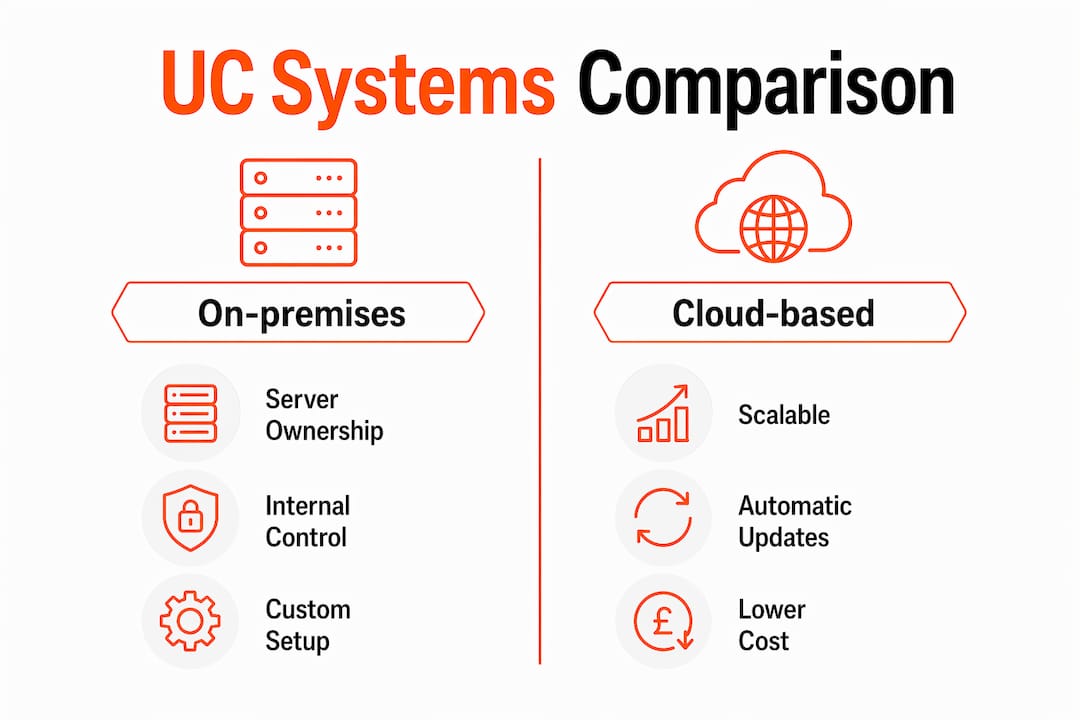
As of early 2026, UC platforms may be on-premises or cloud-based UCaaS, with the cloud model offering scalability and automatic updates that reduce the burden on internal IT teams.
What are the key benefits of unified communication for construction?
Poor internal collaboration results in a 40% loss in productivity, mitigated when UC platforms remove the app-switching friction that creates siloed communication. For construction project managers juggling multiple trades, that figure represents real money and real time.
The benefits of unified communication for construction teams fall into five clear categories:
-
Faster decision-making. When a site supervisor needs a structural engineer’s sign-off on a change, a UC platform lets them escalate from a chat message to a voice call to a shared drawing review without leaving the same interface. Decisions that previously took hours now take minutes.
-
Reduced information silos. Consolidating communication tools into one platform lowers total cost of ownership by reducing vendor licences, admin overhead, and hardware costs. More importantly, it means project information lives in one place rather than scattered across WhatsApp groups, email threads, and phone calls.
-
Support for distributed teams. Construction projects routinely involve field workers, office-based project managers, and remote subcontractors. UC platforms support hybrid and multi-location teams without requiring everyone to be on the same network or device.
-
Lower total cost of ownership. Cloud-based UCaaS shifts firms from capital expenditure to predictable operational costs. That shift matters for construction businesses managing tight project margins.
-
Improved employee well-being. UC reduces stress from toggling multiple apps, supporting hybrid work models and improving staff retention. Construction has a well-documented skills shortage, and reducing daily friction for site teams is a retention tool, not just a productivity one.
Pro Tip: Before adopting a UC platform, audit how many separate communication apps your team currently uses on a typical project. Most construction teams discover they are running five or more tools simultaneously. That number is your baseline for measuring the improvement.
How does unified communication deployment work?
The two main deployment routes are on-premises infrastructure and cloud-based UCaaS. Each carries a different risk and cost profile.
On-premises UC gives your IT team full control over the system. Calls and data stay within your own network, which can be an advantage during internet outages on remote sites. The trade-off is significant upfront hardware investment and ongoing maintenance responsibility.
UCaaS removes that infrastructure burden entirely. UCaaS shifts IT from legacy infrastructure management to supporting innovation, reducing support burden through cloud provider management. For a construction business without a large internal IT function, that shift is a practical necessity rather than a luxury.
The dependency on reliable internet connectivity is the main limitation of cloud UC. A remote site with poor signal creates real gaps in communication. Construction companies adopting UCaaS should assess site connectivity before committing, and consider mobile data backup plans for locations with unreliable broadband.
Popular cloud UC platforms used across industries include Zoom Workplace, Microsoft Teams, and Nextiva. Each offers varying levels of integration with third-party construction apps, which matters when you need your UC platform to connect with project management tools, site diary apps, and document management systems.
What challenges arise when construction teams adopt unified communication?
Cultural adoption failure is the primary UC failure point. Technical deployment alone does not change how people communicate. New habits and procedural training are required alongside the software rollout.
Construction teams face specific adoption challenges that office-based businesses do not:
- Habit inertia. Site workers are accustomed to WhatsApp, phone calls, and face-to-face conversation. Asking them to adopt a new platform requires clear reasoning and visible benefit from day one.
- Multi-location complexity. A project spanning several sites, with different subcontractors on each, means training must reach people who are rarely in the same room.
- Presence indicator literacy. Presence indicators and unified workflows require training to gain adoption. Most site workers have never used a presence status before and will ignore it without guidance.
- Management buy-in. If project managers continue to use personal WhatsApp for instructions, the UC platform becomes a secondary tool rather than the primary one.
The most effective approach is to start with one project team, demonstrate measurable improvement in communication speed and document retention, and then expand. Trying to roll out UC across an entire business at once is the fastest route to abandonment.
Pro Tip: Assign a UC champion on each project, someone who understands both the platform and the site workflow. That person becomes the first point of contact for questions and the visible proof that the system works.
How does unified communication work in construction project workflows?
The practical application of UC in construction is where the concept moves from theory to daily value. Consider a typical scenario: a site foreman discovers a discrepancy between the architect’s drawings and the as-built condition. Without UC, that foreman sends a WhatsApp message, waits for a response, makes a phone call, and then emails a photo. The information is fragmented across three platforms and two devices.
With a UC platform, the foreman raises the issue in a project channel, attaches the photo, tags the project manager and architect, and escalates to a video call within the same thread. The entire conversation is retained in context, searchable, and auditable. That is the importance of unified communication made concrete.
Specific use cases for construction teams include:
- Real-time voice or video coordination between site and office during critical installation phases
- Shared file access for drawings, specifications, and variation orders within the same communication thread
- Group messaging for trade-specific channels, keeping electricians, plumbers, and groundworkers in separate but connected workspaces
- Integration with construction project management apps to link communication directly to tasks, RFIs, and site diary entries
A successful UC implementation depends on persistence of identity, presence, and context across conversations, with calls transitioning smoothly into meetings and chats retaining history. For construction projects, that continuity of context is what prevents the “I never got that message” problem that delays decisions and drives rework.
The connection between UC and schedule adherence is direct. When communication is faster, clearer, and fully documented, fewer decisions are delayed, fewer instructions are misunderstood, and fewer variations arise from miscommunication. You can read more about the cost of communication breakdown in construction to understand the financial scale of the problem UC addresses.
Key takeaways
Unified communication is the single most practical technology investment a construction business can make to reduce project delays caused by fragmented, undocumented communication.
| Point | Details |
|---|---|
| Core definition | UC integrates voice, video, messaging, email, and collaboration into one platform. |
| UC vs unified messaging | UC includes real-time tools; unified messaging covers only asynchronous channels like email and voicemail. |
| Deployment choice | UCaaS offers lower cost and automatic updates; on-premises suits sites with unreliable internet. |
| Biggest adoption risk | Cultural failure, not technical failure, is the primary reason UC implementations stall. |
| Construction benefit | Retained conversation context and faster escalation reduce rework, delays, and miscommunication. |
Why construction professionals underestimate unified communication
I have worked with enough construction project teams to know that most of them already have a version of unified communication. It is just a terrible one. WhatsApp for site updates, email for formal instructions, phone calls for urgent decisions, and a spreadsheet somewhere that nobody updates. That is five tools doing the job of one, and the gaps between them are where projects go wrong.
The misunderstanding I see most often is treating UC as a messaging upgrade. Teams adopt a new chat platform, call it unified communication, and wonder why nothing improves. The real value is not in the messaging. It is in the persistence of context, the ability to move from a chat to a call to a shared document without losing the thread of the conversation.
The other mistake is treating rollout as a one-off event. UC adoption is a behaviour change, not a software installation. The teams that get the most from it are the ones that train continuously, review usage monthly, and adjust their workflows as the platform matures.
My recommendation for any construction business starting out: pick one project, pick one platform, and measure communication-related delays before and after. The data will make the case for wider adoption better than any vendor presentation.
— James
How BRCKS supports unified communication for construction teams

BRCKS is built specifically for construction project teams who need communication and project documentation to work together, not separately. By integrating with WhatsApp and email, BRCKS captures site updates, RFIs, and variation requests in real time, turning everyday messages into structured project records. You get automated site diary entries, a full variation log, and client portal access, all without asking your team to abandon the tools they already use. BRCKS saves users over two hours of manual effort daily. If you are ready to see how construction software for builders can put unified communication to work on your projects, get BRCKS free for 14 days.
FAQ
What is unified communication in simple terms?
Unified communication is the combination of voice, video, messaging, email, and collaboration tools into one platform. It removes the need to switch between separate apps to communicate and share information.
How does unified communication differ from unified messaging?
Unified messaging consolidates only non-real-time channels such as email and voicemail. Unified communication adds real-time tools like voice calls and video conferencing, enabling immediate, context-aware collaboration.
What are the main benefits of unified communication for construction?
The key benefits include faster decision-making, reduced information silos, support for distributed site teams, lower total cost of ownership, and improved staff well-being through reduced app-switching.
Is cloud-based UCaaS suitable for construction sites?
UCaaS works well for construction teams with reliable internet access, offering lower costs and automatic updates. Sites with poor connectivity should assess mobile data backup options or consider a hybrid on-premises approach.
Why do unified communication implementations fail?
Cultural adoption failure is the primary cause. Technical deployment without procedural training and management buy-in results in teams reverting to familiar fragmented tools like WhatsApp and email.
Recommended
- Cloud Communication for UK Construction Teams | BRCKS
- The Hidden 11% Cost: How Poor Communication Between Trades Is Destroying Your Construction Budget | BRCKS
- BRCKS | Construction Project Communication Software
- Top Construction Schedule Software for UK Builders 2025 | BRCKS
How BRCKS Can Help
Adopting a unified communication strategy is no longer a luxury but a necessity for modern projects aiming to reduce delays and costly misunderstandings. BRCKS simplifies this transition by centralising your site diaries, task management, and team messaging within a single, intuitive platform designed specifically for the built environment. By bridging the gap between the office and the field, BRCKS ensures that every stakeholder remains aligned and informed throughout the project lifecycle. We invite you to discover how our software can streamline your workflows and transform your team’s connectivity today. Learn more at BRCKS and explore our full feature set.