Site instruction log: the fields, process and templates you need
A compliant site instruction log is vital for protecting your project from disputes. Learn the essential fields and processes to maintain a robust audit trail.
By James Shorter ·
Site instruction log: the fields, process and templates you need

A compliant site instruction log must record a unique reference, the issuer and date, the full instruction text, the reason behind it, any supporting documents, and a required completion date, plus a space for acknowledgement. Get those fields right and the log holds up in a dispute; miss one and you are relying on memory when someone asks who told whom to do what, and when.
There are two quick ways to get one running today. If you want something you can use this afternoon, copy the minimal field list onto a carbonless NCR pad and start issuing duplicates on site. If you would rather build a searchable record from day one, set up a one-row-per-instruction spreadsheet or digital site diary with the same fields as columns.
- Unique reference number, date issued, issuer, recipient
- Instruction text (specific and unambiguous), reason for the instruction
- Supporting documents referenced, required completion date, signature or acknowledgement
Pro Tip: A digital instruction log that timestamps entries automatically closes the gap between “I told him on site” and “I can prove I told him on site” — which is where most disputes actually get won or lost.
Key Takeaways
A compliant site instruction log needs a unique reference, dated issuer and recipient details, precise instruction text, and a required completion date to hold up under contract scrutiny.
| Point | Details |
|---|---|
| Minimum required fields | Reference number, date, issuer, recipient, instruction text, reason, supporting documents, completion date. |
| Reference the contract clause | Record the JCT, NEC or FIDIC clause number against each entry to protect time and cost entitlement. |
| Acknowledge within two days | Recipients should confirm receipt within 48 hours and flag cost or programme impact within five working days. |
| Combine paper and digital | Issue NCR forms on site for instant signatures, then transcribe into a digital master register the same day. |
| Automate the audit trail | BRCKS logs instructions, acknowledgements and attachments automatically, cutting admin time by 30+ minutes a day. |
Table of Contents
- Essential fields for a site instruction register
- What actually counts as a site instruction?
- How should a site instruction actually be handled?
- Paper NCR pads or a digital register?
- Copy this template into your own register
- Why most site instruction logs fall apart within a month
- Turn your instruction log into an automatic audit trail
- Sources
- FAQ
Essential fields for a site instruction register
Every field earns its place. Leave one out and you weaken the record.
- Reference number – a sequential ID such as SI-014 or a project-coded version like FIT-SI-014. Consistency matters more than the format you pick.
- Date issued – the actual date the instruction was given, not the date it was typed up later.
- Issuer – full name and role (architect, engineer, project manager). Contract type usually dictates the correct job title.
- Recipient – the contractor or subcontractor responsible for carrying it out.
- Instruction text – write it as you would explain it to someone with no context: what, where, and to what standard. “Move the socket” is not an instruction; “relocate double socket on Room 4 east wall 300mm left of door frame” is.
- Reason – design change, site condition, client request, error correction.
- Supporting documents – drawing revision numbers, RFI reference, photos, email threads.
- Required completion date – realistic, and tied to the programme.
Two extra habits pay off. First, record the relevant contract clause number against the instruction, not just the project name. Second, keep original signed NCR copies filed by reference number, and treat the digital register as the master copy everyone actually searches. Document control practices that separate “original evidence” from “working record” avoid a lot of arguments later.
What actually counts as a site instruction?
Not every conversation on site is a formal instruction, and contracts are specific about what qualifies. A site instruction is a formal written directive issued by whoever holds authority under the contract, and it goes by different names depending on which form you are working to.
- Under JCT, it is usually called an Architect’s Instruction (AI).
- Under NEC, it is an instruction from the Project Manager, issued under the relevant clause of the core clauses.
- Under FIDIC, it is an Engineer’s Instruction, and FIDIC’s own guidance sets out how these should be referenced.
- Some US and hybrid contracts use “field order” or ASI (Architect’s Supplemental Instruction) for similar purposes.
The naming differs; the principle does not. Record the contract clause reference against every entry, because that reference is what protects entitlement to extra time or cost later.
Pro Tip: An instruction that changes scope, cost or programme is usually the trigger for a variation. Log the instruction first, then track whether it becomes a variation, rather than waiting to see how it plays out before writing anything down.
Not every instruction stays verbal for long, either. Meeting minutes, drawing mark ups, and even emails can all carry instructional weight if they meet the contract’s definition, so the medium matters less than whether you capture it in the register at all.
How should a site instruction actually be handled?
A consistent process protects everyone, issuer and recipient alike.
- Issue – the authorised person issues the instruction in writing, on an NCR form, by email, or through a project system.
- Record – it goes into the register immediately, with a reference number assigned before anything else happens.
- Acknowledge – the recipient confirms receipt, ideally within 24 to 48 hours.
- Assess impact – the site team or quantity surveyor reviews cost and programme effect.
- Respond – either proceed, or raise a request for information if the instruction is unclear or conflicts with the drawings.
- Implement or claim – work proceeds, and if there is a cost or time impact, that gets lodged as a variation claim against the reference number.
Roles matter here. The issuer is accountable for clarity. The recipient is accountable for flagging impact fast, not after the work is done. The QS or contract administrator owns the register and chases missing acknowledgements.
- Aim for acknowledgement within two working days
- Aim for a cost/time impact reply within five working days on anything non-trivial
- Cross-reference any related meeting minutes or emails against the same instruction number, so the whole trail sits under one reference
Paper NCR pads or a digital register?
Both have a place, and most sites end up running a version of each.

Carbonless NCR forms give you an immediate signed duplicate on site, no battery, no signal needed, and a physical copy in the recipient’s hand before they walk away. That immediacy is hard to beat when you need a signature there and then. The limits show up later: paper is not searchable, storage takes up space, and cross-referencing ten instructions against one variation claim means flicking through a folder.
Digital registers solve the search problem. Every entry is time-stamped, attachments sit against the right reference, and you can filter by contractor, date range, or contract clause in seconds rather than minutes.
- NCR pads: fast, tactile, no setup, poor for search and reporting
- Digital registers: instant search, remote access, built-in audit trail, but need someone disciplined enough to keep them current
Pro Tip: Run both for a while if you are not ready to go fully digital. Issue the NCR on site, then transcribe it into the digital master register the same day. Assign one named person to own that transfer, or it quietly stops happening within a fortnight.
Copy this template into your own register
A workable register needs surprisingly few columns to function properly. Here is a compact layout you can adapt directly.
- Reference, date issued, issuer, recipient
- Instruction text, reason, contract clause (add this column on JCT/NEC/FIDIC projects)
- Supporting documents, required completion date, cost/time impact, status/sign-off
| Field | Sample entry |
|---|---|
| Reference | SI-014 |
| Date issued | 14 March 2026 |
| Issuer / Recipient | J. Patel (PM) / Regal Electrical Ltd |
| Instruction | Relocate double socket, Room 4 east wall, 300mm left of door frame |
| Reason | Client request following furniture layout change |
| Cost/time impact | no cost impact, no programme delay |
Printed suppliers such as TradePrintingUK sell duplicate and triplicate NCR pads built around these same fields, and template libraries including ProjectManagement.com offer downloadable site instruction templates with cost and time impact columns already built in.
Why most site instruction logs fall apart within a month
Most site instruction logs do not fail because the template was wrong. They fail because nobody owned keeping them current, and the reference numbers drift, gaps appear, and within a few weeks the register is a rough guide rather than a record you would trust in a dispute.
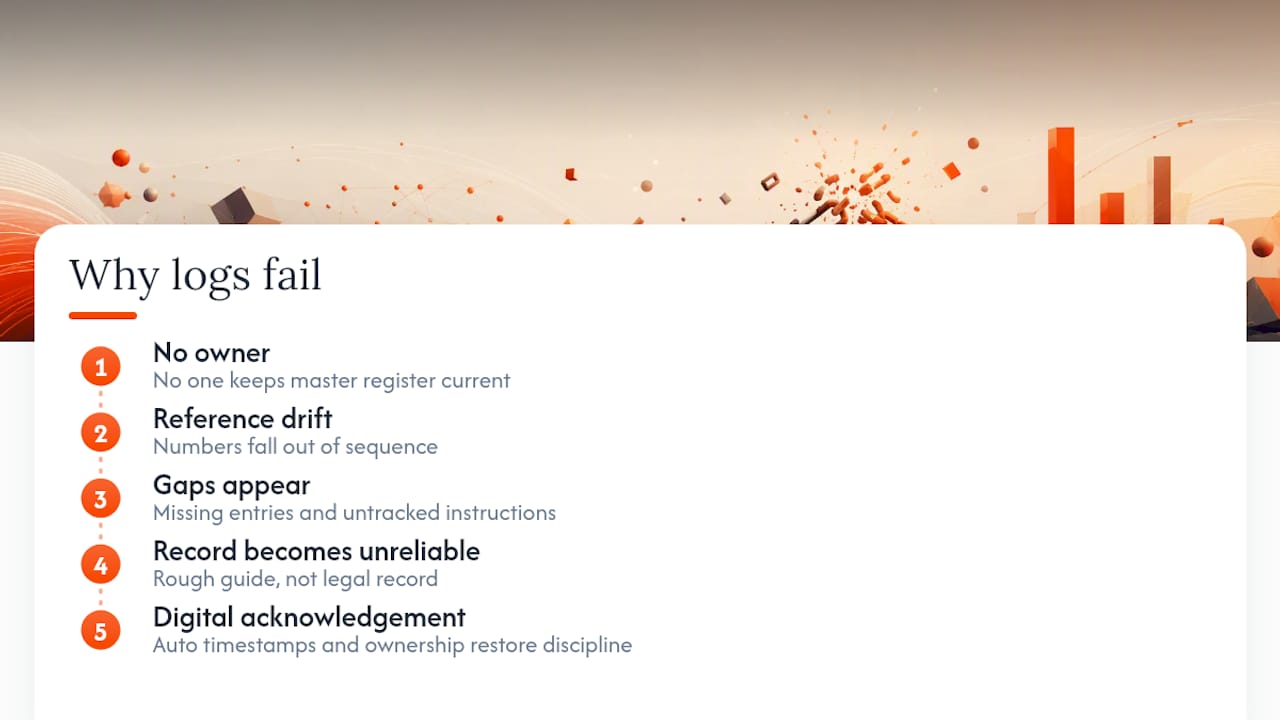
The conventional advice, download a template, print some NCR pads, job done, misses the actual failure point. A template solves the format problem. It does not solve the discipline problem: who transcribes the paper copy, who chases an unacknowledged instruction, who checks the reference numbers still run in sequence after three different people have issued instructions this week.
If I had to pick one thing to prioritise, it would not be the field list. It is deciding, before day one, who owns the master register and what “acknowledged” actually means on your site. A site communication workflow that assigns clear ownership beats a beautifully designed spreadsheet nobody updates.
Digital tools change the economics of this rather than just the format. When acknowledgement and time-stamping happen automatically instead of relying on someone remembering to update a spreadsheet, the discipline problem mostly disappears. That is the real gap between what templates promise and what actually holds up when a variation claim gets challenged.
— James
Turn your instruction log into an automatic audit trail
BRCKS is the alternative to running your site instruction register by hand in a spreadsheet or NCR pad. Every instruction, whether it comes in through email, WhatsApp, or a site conversation, gets logged automatically with a reference, timestamp, and the recipient’s acknowledgement, so the register builds itself as the job runs rather than depending on someone transcribing paper copies at the end of the day.

The fields map directly onto what a compliant register needs: issuer, date, instruction text, supporting attachments, and completion date, all searchable in plain English rather than buried in a filing folder. RFIs and variations link back to the original instruction automatically, so when a cost claim needs evidence, the trail is already there instead of being reconstructed under pressure. Builders using it report fewer disputed variations and clients who can see progress without ringing the site manager for an update. Teams typically save 30 or more minutes a day that would otherwise go on chasing paperwork.
Have a look at the builders’ software page or the site diary app, and start a 14-day trial to see your own instructions logging automatically from day one.
Sources
- Site Instructions in Construction: Legal Meaning, Risks, and Templates (QuollNet)
- Logbook
- Projectmanagement
FAQ
What is a site diary in construction?
A site diary is a narrative daily record of what happened on site, including conversations, weather, and decisions, and it complements a structured instruction register rather than replacing it.
How can I create an instruction template?
Start with the minimum fields, reference, date, issuer, recipient, instruction text, reason, supporting documents, and completion date, then add a contract clause column if you are working under JCT, NEC or FIDIC.
How do I write a report after a site visit?
Record the date, attendees, what was inspected, any instructions issued during the visit with their reference numbers, and follow-up actions with owners and deadlines.
What is a work instruction example?
A clear example reads: “Relocate double socket, Room 4 east wall, 300mm left of door frame, per client request dated 14 March 2026,” logged under a reference such as SI-014 with the relevant contract clause noted.
Can a digital log replace paper NCR forms entirely?
Yes, provided the digital system is secure and records are producible on request, which satisfies the record-keeping standards most UK sites need to meet; many teams still keep NCR pads on hand for instant signatures.
Recommended
- Site Communication Workflow: UK Project Manager’s Guide | BRCKS
- Site Meeting Process 2026: UK Construction Guide
- BRCKS Blog | Page 9
- Pre-construction for UK Stakeholders: CDM 2015 Guide
How BRCKS Can Help
Managing a site instruction log manually is often a recipe for miscommunication and costly delays, but digitising this process ensures every change is tracked and authorised in real time. BRCKS simplifies this workflow by centralising your documentation, allowing project managers to issue instructions and capture approvals directly from the field. By integrating these logs into a single source of truth, BRCKS helps you maintain clear accountability and keep your project on schedule. We invite you to explore how our platform can streamline your site management and bring greater transparency to your next build. Learn more at BRCKS and explore our full feature set.