Snagging application guide for UK builders
A professional guide for UK builders on moving from paper-based defect management to a digital snagging application to reduce disputes and improve site efficiency.
By James Shorter ·
Snagging application guide for UK builders

TL;DR:
- Using a mobile snagging app streamlines defect management through photos, annotations, and real-time tracking. It replaces paper and WhatsApp with an immutable digital record that reduces disputes and speeds up project close-out. BRCKS offers features tailored for UK builders, including offline capture and per-trade visibility, at £40 per seat monthly.
A mobile-first snagging app is the fastest way to capture, assign and close defects on site. The practical choice for UK small-to-medium builders is BRCKS: it combines photo-led checklists, pin-to-plan markup, an audit trail and WhatsApp capture in one searchable project record, saving 30+ minutes of admin per day.
- Recommended approach: use a dedicated snagging application integrated into your project record, not a standalone PDF or WhatsApp thread.
- Why it matters: every snag gets a timestamp, a photo and a named responsible party, so disputes at practical completion are rare.
- Next step: start a 14-day free trial and run one live project through it before committing.
Table of Contents
- What does a snagging application actually do?
- Why builders move from paper and WhatsApp to a snagging app
- What features should you expect from a snagging app?
- How do you choose the right snagging app for your team?
- How to run a snagging walkthrough using an app
- Why BRCKS is the practical choice for UK builders
- What does a snagging app cost in the UK?
- How to pilot a snagging app on your first project
- Key takeaways
- What actually changes when you go digital
- BRCKS: built for UK snagging from day one
- Further reading and useful sources
- FAQ
What does a snagging application actually do?
A snagging application takes the defect management cycle — capture, assign, track, verify, close — and puts it on a mobile device. Instead of handwritten notes and emailed spreadsheets, every snag lives in one place with a photo, a location pin and a status that updates in real time.
The core capabilities you should expect from any credible tool:
- Photo capture and annotation — mark up images with arrows, circles and text directly on your phone.
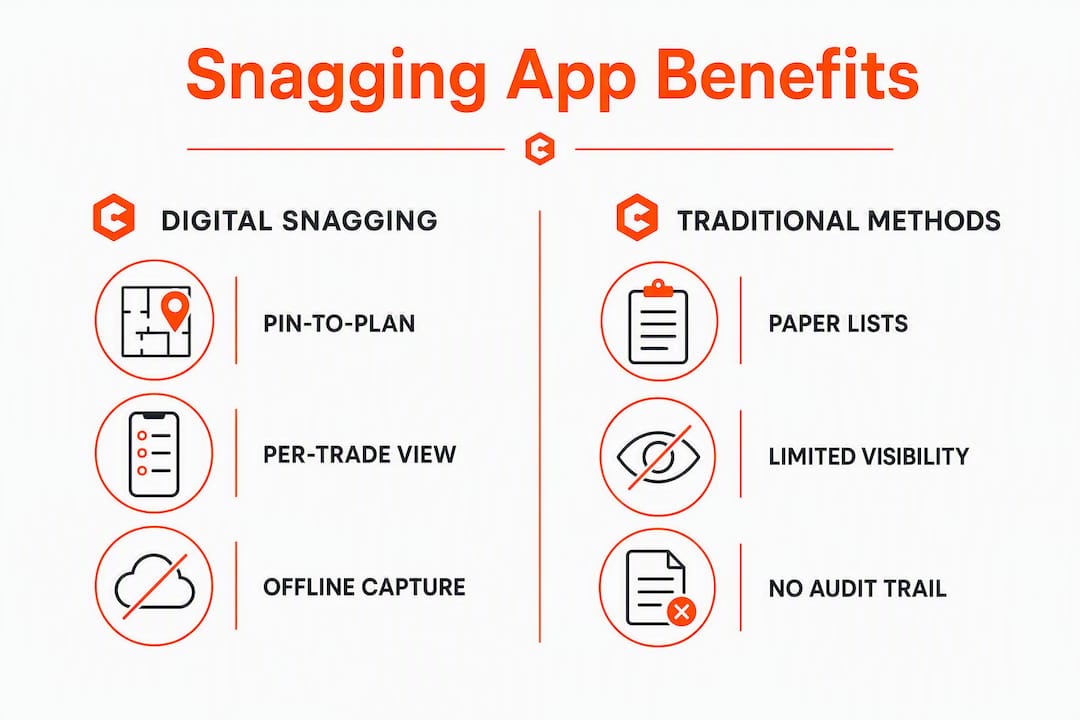
- Pin-to-plan — drop a defect marker onto a drawing so the subbie finds the exact location without a phone call.
- Per-trade filtering — subbies see only their assigned items; no confusion, no excuses.
- Offline capture — record snags on site even without a signal; the app syncs when connectivity returns.
- Status workflows — open, in progress, completed, verified; each stage logged with a timestamp.
- PDF and Excel reporting — generate a professional handover report at the tap of a button.
- Audit trail — every action is timestamped and attributed, forming a complete activity history that supports retention release.
On a walkthrough, you open the app, pin a defect to the drawing, photograph it, assign it to the relevant trade and set a target date. The subbie gets a notification with the photo and location. When the fix is done, you reinspect, add a verification photo and close the item. The whole cycle is documented without a single spreadsheet.
Why builders move from paper and WhatsApp to a snagging app
Paper lists and WhatsApp threads have one thing in common: they disappear. A note gets lost, a message gets buried, and at practical completion you are arguing about who knew what and when. A digital snagging tool creates an immutable record with photo evidence and timestamps, which removes that argument entirely.
The practical benefits for UK builders:
- Clear responsibility — each snag is assigned to a named party, so there is no “that’s not my trade” at handover.
- Photo evidence — before-and-after photos resolve disputes faster than any site meeting.
- No lost notes — everything is backed up to the cloud the moment you capture it.
- Faster close-out — subbies get instant notifications with exact locations, which removes ambiguity and speeds fixes.
- Client reassurance — a branded PDF report at handover shows the client every item was tracked and resolved.
A professional snagger survey typically costs between £300 and £600 in the UK. Running your own digital snagging process throughout the build means you arrive at handover with a short, controlled list rather than a last-minute scramble — and that is a direct saving on remedial costs and programme overrun.
The audit trail also supports retention release. Timestamped photos and location data form handover evidence that is hard to dispute, which protects your payment position.

What features should you expect from a snagging app?
The table-stakes features for any snagging app in 2025–2026 are well established. Here is how each feature maps to the problem it solves:
| Feature | Problem it solves |
|---|---|
| Pin-to-plan / drawing markup | Subbies cannot find the defect without a phone call |
| Photo annotation (before/after) | Disputes about original condition at reinspection |
| Per-trade filtering and vendor portal | Subbies overwhelmed by other trades’ items |
| Offline capture | Poor signal on site blocks real-time recording |
| Status workflow (open → verified → closed) | Items fall through the cracks between visits |
| PDF / Excel report generation | Hours spent collating photos and notes after the walk |
| Audit trail with timestamps | Retention disputes and handover sign-off challenges |
| Integration with PM software and WhatsApp | Double-keying between tools wastes time |
| iOS, Android and web browser support | Mixed device environments across the site team |

Offline-capable mobile apps are particularly important on UK sites where connectivity varies by floor, basement or rural location. Poor offline behaviour is one of the most common adoption blockers reported by site managers.
Per-trade visibility is the single biggest workflow improvement most teams notice after switching from PDF-based snagging. When a plasterer logs in and sees only plastering items, the chasing stops.
A good tool also scales. The same app that handles a 10-unit residential scheme should work on a multi-site commercial fit-out programme without requiring a different licence or a separate implementation.
Pro Tip: Pre-load your drawings before the walkthrough. Pin-to-plan only saves time if the drawings are already in the app when you step onto the floor.
How do you choose the right snagging app for your team?
Start with a selection checklist before you book a demo. The right tool for a two-person maintenance team is different from the right tool for a 50-unit developer, but the evaluation criteria overlap significantly.
Selection checklist:
- Does it work on iOS, Android and a web browser?
- Can subbies access their items without a paid licence?
- Does it support offline capture with automatic sync?
- Can you pin defects to a drawing and annotate photos?
- Does it filter by trade or package?
- Can it generate a PDF or Excel report in one step?
- Does it maintain a full audit trail with timestamps?
- Does it integrate with your existing PM software or WhatsApp?
- Is UK data storage and GDPR compliance documented?
- What does it cost per seat, and what is included in the trial?
Questions to ask in a demo:
- What is the scope of the trial — full features or a limited subset?
- How do subcontractors access their snags — app download, web link, or email?
- Can we export all data (photos, reports, audit logs) when we leave?
- How does drawing pinning work when drawings are revised mid-project?
- Does the reinspection workflow create a separate record or overwrite the original?
Red flags to watch for:
- Complex setup that requires a consultant or multi-day onboarding.
- Pay-per-snag or pay-per-project pricing that penalises active use.
- No offline mode, or offline mode that loses data on sync.
- No audit trail or per-trade filtering — these are not optional extras.
Site managers should prioritise end-to-end visibility, integrated workflows and instant reporting when shortlisting. If a tool cannot show you a live dashboard of open snags by trade and status, it is not a snagging tool — it is a photo album.
For a side-by-side shortlist, the best snagging app comparison for UK builders covers the leading options in detail.
How to run a snagging walkthrough using an app
The workflow below applies to any mobile-first snagging application. The steps are the same whether you are doing a pre-handover sweep on a new build or a mid-project quality check on a fit-out.
- Pre-walk prep — upload the current drawing set, create location levels (floor, zone, room) and confirm which trades are active on the project.
- Open the app on site — select the project and the relevant drawing. Offline mode activates automatically if there is no signal.
- Capture each defect — photograph the issue, annotate the image, pin it to the drawing and write a brief description. Assign it to the responsible trade immediately.
- Set a target date — align the rectification deadline with the programme. Do not leave it open-ended.
- Notify the subcontractor — role-based notifications send the subbie a photo, location and deadline without any manual chasing from you.
- Subcontractor fixes and evidences — the subbie uploads a completion photo and marks the item as done.
- Reinspect and verify — visit the location, check the fix, add a verification photo and close the item. The audit trail records who verified it and when.
- Generate the handover report — export a PDF or Excel report covering all items, statuses and evidence for the client or employer’s agent.
Pro Tip: For subbies who are not comfortable with apps, BRCKS lets them log snags and updates via WhatsApp. They message the dedicated project number and BRCKS files it against the right project automatically — no app download required.
Use checklist templates for repeat inspection types (pre-plaster, pre-second fix, pre-handover). Loading a template at the start of a walk means you cover every category without relying on memory.
Why BRCKS is the practical choice for UK builders
BRCKS was built by a founder with 20 years in construction. That background shows in the feature set: it covers the exact pain points that matter on a UK site rather than the generic project management features that look good in a brochure.
The feature alignment for snagging workflows:
| Snagging need | BRCKS capability |
|---|---|
| Photo-led checklists | Built-in; photos captured and filed against the project record |
| Pin-to-plan drawing markup | Supported; drawings versioned and stored in the project |
| Per-trade visibility | Vendor portal; subbies and clients invited free |
| WhatsApp capture | Dedicated business number; messages auto-filed to the project |
| Audit trail | Every action timestamped and attributed; supports RFI and variation logs |
| Offline capture | Mobile app works without signal; syncs on reconnection |
| PDF / Excel reporting | One-step export for handover and client reports |
BRCKS serves the full range of UK building firms: small residential builders running 5–20 unit schemes, fit-out contractors managing multi-trade programmes, and maintenance teams handling reactive defect work across a property portfolio. The construction snagging software page covers how the platform approaches quality control in more depth.
Use-case examples where BRCKS fits directly:
- A small builder completing a 12-unit residential development needs a clean handover pack for the housing association — BRCKS generates the PDF report and audit trail in one step.
- A fit-out contractor managing 15 subbies across a commercial refurbishment needs per-trade visibility and WhatsApp capture for trades who will not download another app.
- A maintenance team handling reactive snags across a managed property portfolio needs offline capture and a searchable record of every defect and fix.
What does a snagging app cost in the UK?
Pricing for snagging applications in the UK follows a few common shapes. Understanding them before a demo stops you being surprised by the invoice.
Typical pricing shapes:
- Free tier — limited snags, limited projects, no PDF export. Useful for a homeowner; not sufficient for a site manager running multiple trades.
- Per-seat subscription — most professional tools charge per named user per month. Expect £20–£60 per seat per month for a full-featured tool, billed monthly or at a lower rate annually.
- Enterprise / volume pricing — larger teams and multi-site programmes are usually quoted separately.
- Subcontractor and client access — check whether subbies need a paid seat. Tools that charge per subcontractor become expensive fast on a multi-trade project.
BRCKS is priced at £40 per seat per month billed annually. Subcontractors, trades and clients are invited free, which keeps the cost predictable regardless of how many subbies are on the project.
What to test during a 7–14 day trial:
- Offline capture — go somewhere with no signal and record three snags. Check they sync correctly when you reconnect.
- Subcontractor onboarding — invite one subbie and confirm they can access their items without a paid licence.
- Drawing pinning — upload a PDF drawing and pin two defects to it. Check the location is clear on the report.
- Report export — generate a PDF report and check the layout is professional enough to send to a client or employer’s agent.
- Data export — confirm you can export all photos, reports and audit logs before the trial ends.
Cost considerations beyond the seat price:
- Number of active projects running simultaneously.
- Whether integrations (WhatsApp, email, PM software) are included or charged as add-ons.
- Data export and exit costs if you switch tools later.
How to pilot a snagging app on your first project
A short pilot on one project or phase is the recommended way to validate a snagging app without disrupting delivery. Keep the scope tight and the success metrics clear before you start.
Pilot checklist:
- Select a small project or a single phase of a larger one.
- Identify two or three stakeholders: site manager, one subcontractor, and the client or employer’s agent.
- Pre-load the current drawing set and create the location structure (floors, zones, rooms).
- Invite one or two subbies and confirm they can access their items before the walkthrough.
- Define success metrics before the pilot starts (see below).
- Run one full walkthrough, assign all snags and track through to close-out.
- Generate the handover report and review it with the client.
Suggested success metrics:
- Time-to-close per snag compared with your previous project.
- Number of open snags remaining at handover (target: zero critical items).
- Admin hours saved on report preparation.
- Number of disputes or “who’s responsible” conversations during close-out.
After the pilot, review the metrics with the team. If time-to-close improved and the handover report was accepted without revision, the tool is working. Roll it out to the next project and expand the subcontractor invites. If adoption was patchy, check whether the interface was too complex for subbies — field capture needs to be near-zero training for the tool to stick.
The snag list software page has templates and process guides to help you set up the pilot quickly.
Key takeaways
A dedicated snagging application with pin-to-plan, per-trade visibility, offline capture and a full audit trail is the most direct way to reduce disputes, speed close-out and protect your payment position at practical completion.
| Point | Details |
|---|---|
| Mobile-first capture is non-negotiable | Offline mode and pin-to-plan are table-stakes; test both before committing to any tool. |
| Per-trade visibility cuts chasing | Subbies who see only their items fix faster and dispute less. |
| Audit trail protects payments | Timestamped photos and location data support retention release and handover sign-off. |
| Pilot on one project first | A 7–14 day trial on a single project or phase validates the tool without disrupting delivery. |
| BRCKS at £40/seat/month | Subcontractors and clients are free; WhatsApp capture means subbies need no app download. |
Link snagging close-out to your payment milestones — a clean, evidenced snag list at practical completion is the clearest route to releasing retention without dispute.
What actually changes when you go digital
The conversation I hear most often from builders who have switched to a digital snagging workflow is not about features — it is about confidence. Walking into a handover meeting with a timestamped PDF that shows every snag raised, assigned, fixed and verified changes the dynamic entirely. The client cannot dispute what is documented.
The tools that stick on site are the ones that require almost nothing from subbies. If a plasterer has to download an app, create an account and navigate a dashboard to see their two items, they will not do it. The tools that work are the ones where the subbie gets a message, taps a link, sees a photo and a location, and marks it done. That is the bar to set in a demo.
One more thing worth saying: do not wait until the final week before handover to start snagging. The snagging process works best when it runs progressively through the build, at trade completion and again before handover. A tool that is only used in the last five days is not a snagging tool — it is a panic list.
BRCKS: built for UK snagging from day one
Fewer disputes at handover, no chasing subbies for updates, and a professional PDF report ready before the client walks through the door. That is what a well-run digital snagging process delivers, and it is exactly what BRCKS is built for.

BRCKS gives you photo-led checklists, pin-to-plan drawing markup, per-trade vendor portal access, WhatsApp capture for subbies who will not download another app, and a full audit trail that covers RFIs and variations alongside snags. Subcontractors and clients are invited free. The seat price is £40 per month billed annually, with no hidden charges for subcontractor access or data export.
Start a 14-day free trial and run your next snagging sweep through it. One project is enough to see whether it fits your workflow.
Further reading and useful sources
BRCKS pages:
- Snagging app for UK construction — product page covering photo-led checklists, WhatsApp capture and audit trail.
- Snag list software for UK project managers — templates, process guides and feature detail.
- Best snagging app UK: honest comparison — shortlist guidance and feature comparison.
- Snagging list:the ultimate UK guide — long-form process guide with templates.
UK industry references:
- Construction snag list: process, examples and template — QIC Management Systems; detailed process guidance and a practical snag list template.
- Benefits of snagging tools in construction — UK Construction News; industry commentary on digital adoption.
FAQ
What is the best app for snagging in the UK?
BRCKS is a strong choice for UK builders and project managers: it combines photo-led checklists, pin-to-plan, WhatsApp capture and a full audit trail, with subcontractors invited free. The best snagging app comparison covers the leading options side by side.
Can I do a snagging survey myself?
Yes. A snagging application lets you photograph, annotate and track every defect from your phone, producing a professional report that carries real weight with developers and contractors. A professional snagger survey in the UK typically costs between £300 and £600, with an average reported around £377, so a digital tool used throughout the build is a practical alternative or complement.
What is the snagging process?
Snagging is the structured inspection of construction work to identify incomplete, defective or unacceptable items before practical completion. Each item is recorded with a location, photo, responsible party and target date, then tracked through to verified close-out and handover.
How much does a snagger cost in the UK?
A professional snagging survey in the UK typically costs between £300 and £600, with an average around £377. Running your own digital snagging process with a dedicated app throughout the build reduces the need for a full professional survey at handover.
Does a snagging app work without an internet connection?
Offline-capable apps are standard among professional snagging tools and are particularly important on UK sites where connectivity varies. Snags captured offline sync automatically when the device reconnects — test this specifically during any trial period.
Recommended
- Snagging Inspection: The Complete UK Guide (2026) | BRCKS
- Snagging List: The Ultimate UK Guide (2026) | BRCKS
- BRCKS | Construction Project Communication Software
- Best Construction Apps UK: 2026 Guide for Builders
How BRCKS Can Help
Effective snagging is the cornerstone of a high-quality handover, and having the right digital tools makes all the difference in maintaining your professional reputation. BRCKS simplifies this entire process by providing a centralised platform where UK builders can record, assign, and track defects in real time, ensuring nothing is overlooked before the keys change hands. By integrating these workflows into your daily routine, you can reduce costly delays and deliver a superior finish for every client. We invite you to explore how BRCKS can transform your site management and help you achieve snag-free completions today. Learn more at BRCKS and explore our full feature set.