What is a unified project hub for construction?
A unified project hub centralises all project data, tools, and teams into one governed platform, improving visibility and reducing costly construction delays.
By James Shorter ·
What is a unified project hub for construction?

TL;DR:
- A unified project hub centralises all project data, tools, and teams into one governed platform, improving visibility and collaboration. It enables proactive risk management, automates repetitive tasks, and reduces delays, leading to better project outcomes. Successful implementation depends on standardising data standards and fostering team adoption to maximise its value.
A unified project hub is a centralised platform that integrates all project tools, data, and teams into a single governed environment, giving construction managers one place to track financials, compliance, documents, and communications. In construction, where fragmented information causes delays and costly errors, understanding what a unified project hub delivers is no longer optional. Platforms like Quickbase’s Project Hub, Egnyte Project Hub, and Monton have made this concept concrete and deployable. The core promise is real-time visibility across every workstream, from RFI tracking to subcontractor access, without switching between disconnected apps. For UK construction teams managing tight programmes and complex supply chains, that promise translates directly into fewer delays and better decisions.
What is a unified project hub in construction?
A unified project hub, also called a centralised project management hub, is a single pane of glass across all project data, tools, and teams. It replaces the scattered combination of spreadsheets, email threads, and standalone apps that most site teams rely on today. Every RFI, submittal, compliance record, and budget update lives in one place, accessible to the right people at the right time.
The distinction between a project management hub and a standard project management tool matters. A standard tool tracks tasks. A hub governs the entire project ecosystem, connecting financials, documents, field data, and team communications under one roof. Quickbase describes this as moving from reactive task management to proactive project orchestration.
For construction specifically, the hub model addresses a structural problem. Site managers, quantity surveyors, subcontractors, and clients all need different slices of the same project data. A hub delivers that through role-based access, meaning each party sees exactly what they need without compromising data security or version control.
What core features define a construction project hub?
Unified project hubs integrate financials, labour allocation, materials tracking, and safety compliance into centralised dashboards that reduce delays and errors. That integration is what separates a hub from a collection of connected tools. The dashboard does not just display data. It surfaces risk alerts, schedule impacts, and budget variances before they become crises.
The key features to look for in any construction project hub include:
- Centralised dashboards providing real-time project health scores and risk alerts across all active projects
- Role-based access control so subcontractors, clients, and internal teams each see the appropriate data without manual permission management
- Version control and secure folder structures that prevent document mismanagement across partners and supply chains
- Automation of repetitive governance tasks such as project setup, folder creation, and compliance checklists
- Mobile and field access so site managers can log updates, view drawings, and raise issues without returning to the office
- Integration with financial and procurement tools including QuickBooks, Procore, and Autodesk for end-to-end project visibility
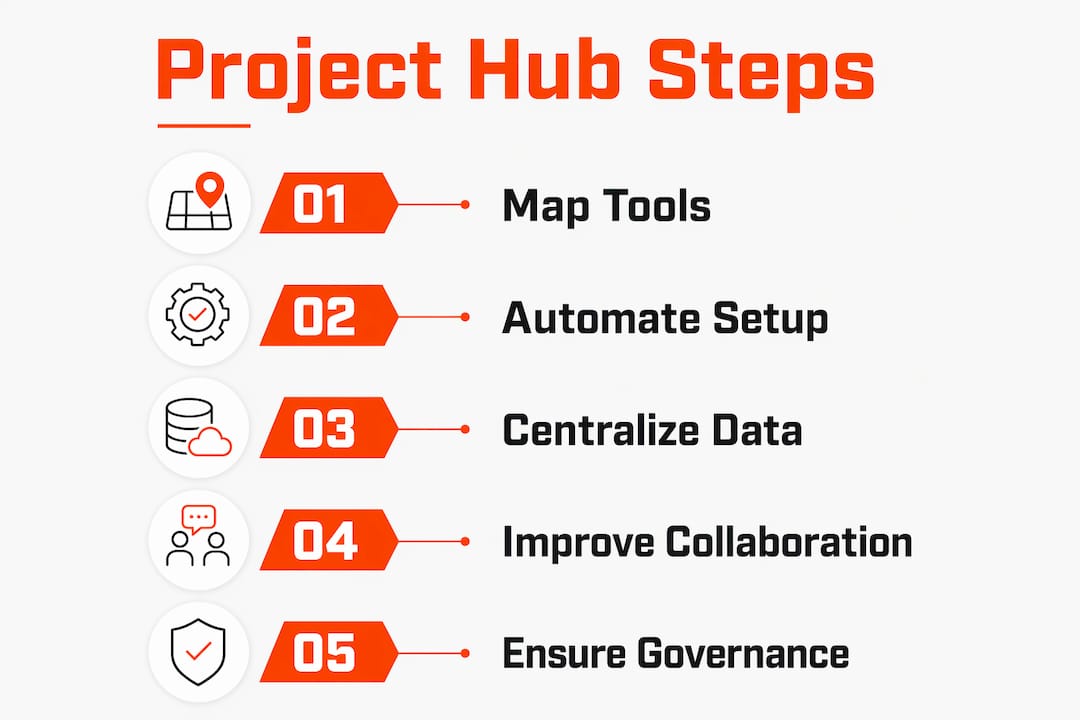
Pro Tip: Before selecting a hub platform, map every tool your team currently uses and confirm the hub can either replace or integrate with each one. Partial integration creates new fragmentation rather than solving it.
The automation capability deserves particular attention. Smart folder templates and permission inheritance reduce setup time per project and maintain consistent access standards across the portfolio. For firms running ten or more concurrent projects, that consistency is the difference between controlled delivery and administrative chaos.
How do project hubs improve efficiency and collaboration?
The efficiency gains from a unified project management hub are measurable and specific. Eliminating tool switching recovers approximately one hour of productive time per project manager per day. Across a team of five managers, that is five hours of recovered capacity every working day.
The collaboration benefits follow a clear sequence:
- Faster onboarding. New team members access a consistent entry point for all project tasks, documents, and communications from day one. There is no hunting for the right folder or asking colleagues where things are stored.
- Proactive risk management. Hubs highlight schedule impacts and budget overruns early, before small delays compound into programme failures. Managers shift priorities based on live data rather than weekly reports.
- Reduced document errors. Version control and centralised storage eliminate the risk of teams working from outdated drawings or superseded specifications.
- Improved client communication. Clients access a dedicated portal view rather than receiving ad hoc emails, which reduces interruptions to the project team.
- Reduced context switching fatigue. Consolidating project data into one screen improves mental focus and reduces the cognitive load that fragments attention across multiple platforms.
“The transition to a unified hub moves organisations from managing tasks to orchestrating project outcomes with transparency for executives.” — Monton
The psychological dimension is underappreciated. Context switching between five or six tools does not just waste time. It degrades decision quality. When a project manager spends the first twenty minutes of a meeting locating the correct version of a programme, the meeting itself becomes less productive. A hub eliminates that friction entirely.
Understanding the benefits of centralised project information goes beyond efficiency metrics. It changes how teams communicate, how risks are surfaced, and how clients experience the project.
What are the challenges of implementing a project hub?
Implementation is where most firms encounter difficulty. The technology is rarely the problem. The challenge is standardising data formats, folder structures, and metadata across teams that have developed their own working practices over years.
Common implementation challenges include:
- Inconsistent naming conventions across projects, making automated reporting unreliable
- Resistance from experienced team members who are comfortable with existing tools and sceptical of change
- Brittle integrations when connecting the hub to legacy financial or procurement systems without proper API support
- Incomplete data migration from previous projects, leaving historical records inaccessible within the new system
- Underestimating training time required for field teams who may have limited digital confidence
The metadata alignment issue is particularly critical. Automated reports depend on consistent data inputs. If one project manager labels a cost code differently from another, the portfolio dashboard produces misleading figures. Aligning these standards before go-live is not optional. It is the foundation on which the hub’s value rests.
The best practice approach is gradual integration. Start with one project type or one team, prove the value, then expand. Firms that attempt a full portfolio migration in one step typically encounter adoption resistance and data quality problems simultaneously.
Pro Tip: Appoint a hub champion within each project team. This person owns data quality for their project and acts as the first point of contact for colleagues with questions. Peer support drives adoption faster than top-down mandates.
Automating governance through smart templates reduces the manual effort of maintaining standards. When folder structures and permission sets are created automatically at project setup, the risk of human error drops significantly. Pair this with a short onboarding session for each new project team and adoption becomes a process rather than a battle.
For teams looking to understand how document control in construction connects to hub implementation, the principles of version control and centralised storage apply directly.
Comparing leading project hub platforms for construction
Quickbase, Egnyte, and Monton each approach unified project management from a different angle. Each platform supports mobile access, real-time data, and secure permissions, but their core strengths differ in ways that matter for construction teams.
| Platform | Core Strength | Key Integrations | Best Fit |
|---|---|---|---|
| Quickbase Project Hub | Workflow automation and custom app building | QuickBooks, Procore, Salesforce | Mid-to-large contractors needing bespoke workflows |
| Egnyte Project Hub | Document control and secure folder governance | Autodesk, Microsoft 365, Google Workspace | Firms with complex document management needs |
| Monton | Staffing integration and project portfolio visibility | HR and resource planning tools | Project managers overseeing multiple concurrent projects |
Quickbase excels at connecting construction workflows to financial and CRM systems. Its low-code environment allows project managers to build custom dashboards without developer support. Egnyte’s strength is document security and version control, making it the preferred choice for firms handling sensitive client data or working under strict compliance requirements. Monton focuses on the human side of project management, integrating staffing and resource allocation directly into the project view.
Pro Tip: Request a sandbox trial of any platform before committing. Load one live project’s data and test the reporting against your actual use cases. A demo environment rarely reflects the complexity of real construction data.
The benefits of project communication platforms extend beyond the hub itself. The platform you choose shapes how your team communicates, how clients receive updates, and how quickly you can respond to site issues. Choose based on your most critical workflow, not the longest feature list.
Key takeaways
A unified project hub delivers measurable efficiency gains only when data standards, team adoption, and integration are treated as equal priorities alongside the technology itself.
| Point | Details |
|---|---|
| Core definition | A unified project hub centralises all project tools, data, and teams into one governed platform. |
| Efficiency gains | Eliminating tool switching recovers approximately one hour of productive time per manager per day. |
| Risk management | Real-time dashboards surface schedule and budget risks before they escalate into project failures. |
| Implementation priority | Aligning folder structures and metadata standards before go-live is critical for accurate automated reporting. |
| Platform choice | Quickbase, Egnyte, and Monton each suit different construction use cases based on workflow, document, or staffing needs. |
Why the real value of a project hub is not what most teams expect
Most project managers I speak with expect a unified hub to save them time. It does. But the deeper value is something they rarely anticipate: it changes the quality of the decisions they make.
When you are no longer spending the first hour of your day pulling data from four different systems, you arrive at your first decision of the day with full context and a clear head. That shift is not marginal. Over a twelve-month project, it compounds into materially better outcomes on budget, programme, and client satisfaction.
The firms that struggle with hub adoption are almost always the ones that treat it as a software rollout rather than an operational change. They install the platform, run a one-hour training session, and expect behaviour to change. It does not. The teams that succeed spend as much time on data governance and change management as they do on configuration.
The future direction is clear. AI-powered automation within these platforms will handle routine governance tasks, flag anomalies in financial data, and generate progress reports without human input. The project managers who build strong data habits now will be the ones who extract the most value from those capabilities when they arrive.
The uncomfortable truth is that a hub is only as good as the data you put into it. Invest in the standards first. The technology will do the rest.
— James
How BRCKS brings unified project management to UK construction teams
Construction teams in the UK often struggle with fragmented communication long before they consider a formal project hub. BRCKS addresses that problem at the source by capturing site communications and project updates in real time, turning everyday WhatsApp messages into structured project records.

BRCKS gives builders and electricians a centralised view of their projects without the complexity of enterprise software. Automated site diaries, RFI tracking, and variation logs replace the manual effort that consumes hours each day. The result is a project record that is always current, always accessible, and always accurate. If you are ready to move away from fragmented tools and towards a single source of truth for your projects, try BRCKS free for 14 days.
FAQ
What is a unified project hub?
A unified project hub is a centralised platform that integrates all project data, tools, and teams into one governed environment. It replaces disconnected apps and manual reporting with real-time dashboards and automated workflows.
How does a project hub differ from standard project management software?
Standard project management software tracks tasks. A project hub governs the entire project ecosystem, connecting financials, documents, compliance, and communications under one roof with role-based access for all stakeholders.
What are the main benefits of project hubs for construction managers?
The main benefits include recovering approximately one hour of productive time per day by eliminating tool switching, proactive risk management through real-time budget and schedule monitoring, and faster onboarding for new team members.
Which platforms offer the best project hub tools for construction?
Quickbase, Egnyte, and Monton are the leading platforms, each with distinct strengths in workflow automation, document control, and staffing integration respectively. All three support mobile access and secure permissions for construction teams.
What is the biggest challenge when implementing a unified project management hub?
The biggest challenge is standardising data formats, folder structures, and metadata across teams before go-live. Without consistent data inputs, automated reporting produces inaccurate results and the hub’s value is significantly reduced.
Recommended
- Construction Software for Builders | BRCKS
- What is a Project Management Platform? UK Construction Guide
- 5 Best Construction Client Portal Alternatives 2026
- UK Construction Project Coordination Best Practices 2026 | BRCKS
How BRCKS Can Help
Adopting a unified project hub is no longer a luxury but a necessity for teams aiming to eliminate costly communication gaps and data silos. By integrating every facet of your workflow into a single source of truth, BRCKS empowers construction professionals to regain control over their projects and drive better margins. Our platform simplifies complex coordination, ensuring that your office and site teams remain perfectly aligned from start to finish. We invite you to discover how BRCKS can transform your operational efficiency by exploring our features today. Learn more at BRCKS and explore our full feature set.