What is action item automation for construction projects?
Discover how action item automation transforms site meetings into structured tasks, boosting completion rates and reducing administrative overhead for construction teams.
By James Shorter ·
What is action item automation for construction projects?

TL;DR:
- Action item automation uses AI to automatically capture, assign, and track meeting tasks for construction projects. It improves task completion rates, accelerates follow-up, and enhances accountability while reducing administrative effort. Proper setup and human verification are essential to prevent task bloat and orphaned responsibilities.
Action item automation is the process of using AI and workflow tools to automatically capture, assign, and track project tasks from meetings, removing the need for manual note-taking and follow-up. For construction project managers, this is not a minor efficiency gain. It is the difference between a site meeting that produces clear accountability and one that produces a WhatsApp thread nobody acts on.
The core technology works by transcribing spoken conversations, extracting tasks using natural language processing, and pushing structured items into project management tools like Jira or Notion. 39% of commitments made in meetings are forgotten without automation. That figure alone explains why so many construction projects run over programme.

What is action item automation and how does it work in construction?
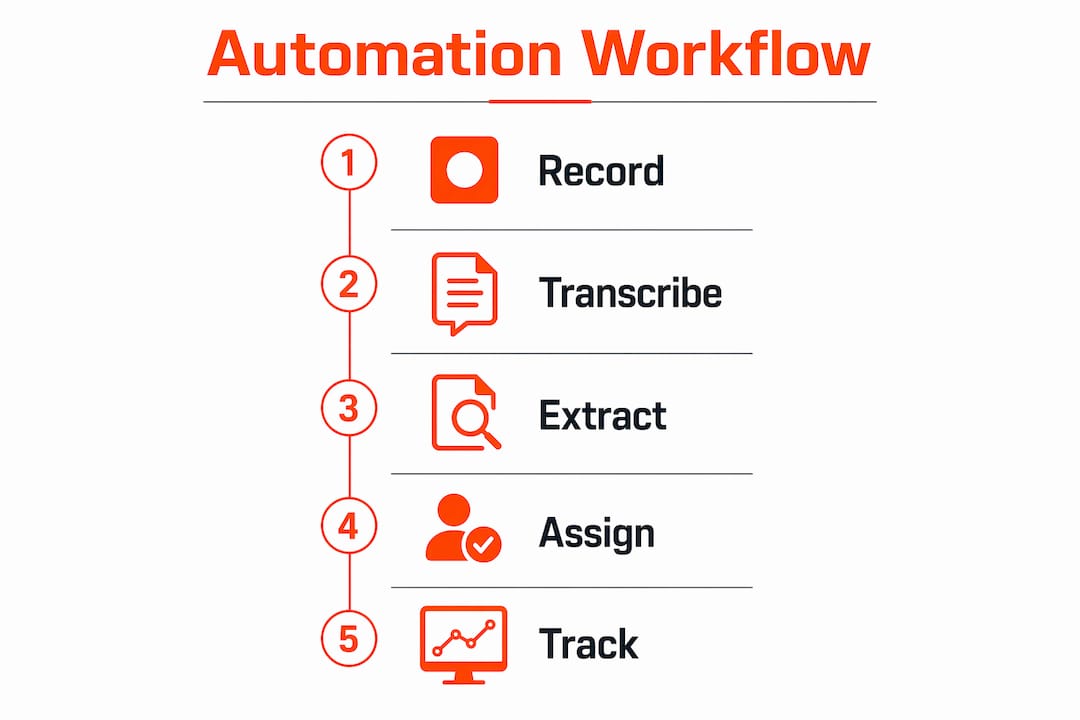
Action item automation captures tasks from meetings and distributes them to the right people without anyone having to type up notes afterwards. The process has three stages: transcription, extraction, and distribution.
First, an AI tool records and transcribes the meeting. Then, natural language processing scans the transcript to identify commitments. AI extracts and assigns tasks by analysing language patterns in transcripts, creating structured lists that push directly to issue trackers like Jira or Notion. This removes the gap between what was agreed in a site meeting and what actually appears in your project tracker.
For the automation to work correctly, every task needs what is called a Minimum Viable Structure. Automation requires four minimum fields: task description, owner, deadline, and priority. Without all four, the system cannot push the item to your project software reliably. Construction teams that skip this setup end up with incomplete records that are worse than useless.
Distribution speed matters too. Sending meeting notes within one hour of a meeting increases task completion by 34%. On a busy construction site, that window closes fast. Automated distribution removes the bottleneck entirely.
Pro Tip: End every site meeting with an explicit verbal summary: state each task, the owner’s name, and the deadline out loud. Poor quality transcripts and vague commitments reduce AI accuracy significantly. A 60-second closing ritual makes the difference between clean extraction and a list full of orphaned tasks.
What are the benefits of automating action item management?
Automated action item management produces measurable improvements in task completion, accountability, and follow-up speed. These are not marginal gains.
Automation improves task completion to 91% compared to 61% with manual methods. That 30-point gap represents real project outcomes: fewer delays, fewer missed inspections, fewer variation disputes caused by forgotten instructions. For a construction project manager running multiple subcontractors, that difference is significant.
The time savings are equally direct. AI-driven automation saves over 30 minutes per meeting by removing manual note-taking and follow-up work. Across a week of site meetings, progress reviews, and client calls, that adds up to hours returned to actual project management.
Follow-up speed improves dramatically too. AI reduces follow-up times from 3.2 days to same-day completion. On a construction project, a 3-day delay in chasing a subcontractor about a structural query can cascade into a week’s programme slip. Same-day follow-up closes that risk before it compounds.
Key benefits for construction project managers include:
- Accountability: Every task has a named owner and a deadline, visible to the whole team.
- Reduced lost commitments: Automated capture means verbal agreements become tracked records.
- Faster follow-up: Tasks reach the right person the same day, not three days later.
- Better visibility: Overdue items and missed commitments are flagged automatically, not discovered at the next meeting.
- Time savings: Project managers spend less time writing up notes and more time managing the project.
What are the common pitfalls when implementing action item automation?
The biggest risk in action item automation is not technical failure. It is poor configuration leading to a system that creates more noise than clarity.
Task bloat is the most common problem. Automation causes task bloat when filters are not set up to exclude items that lack an owner or a deadline. If every casual comment in a site meeting becomes a formal task, your tracker fills with irrelevant items and the team stops trusting it. The fix is to configure your extraction prompts to enforce the Minimum Viable Structure before any item is pushed to your project tool.
Orphaned tasks are the second major risk. Without clear assignment of Responsible and Accountable roles using a RACI matrix, automation generates tasks that belong to nobody. A task assigned to “the team” is a task assigned to nobody. Construction projects involve multiple subcontractors, consultants, and client representatives. Without explicit ownership, automated tasks disappear into the same void as the WhatsApp messages they were meant to replace.
Human oversight remains non-negotiable. Action item automation should be treated as augmentation requiring human verification, particularly on high-stakes construction projects. AI can misread context, misattribute ownership, or miss a commitment buried in technical discussion. A project manager still needs to review the extracted list before it goes live.
Common pitfalls to watch for:
- Capturing minor suggestions as formal tasks, inflating the tracker.
- Failing to define ownership clearly before automation goes live.
- Treating the first configuration as final rather than iterating on prompts.
- Skipping feedback loops that flag missed commitments across multiple meetings.
Pro Tip: Use a RACI matrix before you configure your automation. Defining Responsible and Accountable roles upfront means the system knows who to assign tasks to. Without it, you are automating confusion rather than resolving it.
How to implement action item automation in construction projects
A structured implementation takes 2–4 weeks and produces reliable results from the start. Rushing the setup is the single most common reason teams abandon the system after a month.
Follow these steps:
-
Audit your current meetings. Identify which meetings produce the most action items: site progress meetings, subcontractor reviews, client calls. These are your highest-value targets for automation.
-
Choose your tools. Select an AI transcription tool that integrates with your existing project tracker. Tools that connect to Jira, Notion, or a construction task tracking system will give you the most direct workflow benefit.
-
Define your Minimum Viable Structure. Before the first automated meeting, agree on the four required fields: task, owner, deadline, priority. Document this so every meeting lead knows the standard.
-
Configure extraction prompts. Set your AI tool to only extract items that meet the Minimum Viable Structure. This prevents task bloat from day one.
-
Run a pilot. Test on one meeting type for two weeks. Review the extracted tasks manually and compare them against what was actually agreed. Adjust your prompts based on what the AI missed or misread.
-
Measure and iterate. Track completion rates, overdue items, and missed commitments. Tracking missed commitments across multiple meetings enables early risk detection that a simple task list cannot provide.
| Implementation stage | Typical timeframe | Key output |
|---|---|---|
| Audit and tool selection | Week 1 | Shortlist of meetings and tools |
| Configuration and RACI setup | Week 1–2 | Extraction prompts and ownership rules |
| Pilot run | Week 2–3 | First automated task lists |
| Review and prompt tuning | Week 3–4 | Refined extraction accuracy |
| Full deployment | Week 4 onwards | Live automated workflow |
| Point | Details |
|---|---|
| Define minimum structure first | Every task needs an owner, deadline, and priority before automation can push it to your tracker. |
| Speed of distribution matters | Sending tasks within one hour of a meeting increases completion rates by 34%. |
| Task bloat is the biggest risk | Configure filters to exclude items without complete ownership and deadline fields. |
| Human review remains necessary | Automation augments project managers; it does not replace their judgement on high-stakes items. |
| Measure missed commitments | Tracking overdue tasks across meetings reveals project risks earlier than any task list alone. |
Why automation changes the project manager’s role, not just the process
Action item automation shifts the project manager’s role from scribe to accountability coach. I have seen this play out on UK construction projects where the PM was spending the first hour after every meeting typing up notes, chasing confirmations, and updating trackers manually. That is not project management. That is administration.
What changes with automation is not just the time saved. It is what you do with that time. Automation shifts project managers from note-taking to accountability coaching, using data to unblock tasks proactively. When your system flags that a subcontractor has missed the same commitment across three consecutive meetings, you act before it becomes a programme issue. Without automation, you discover it at the fourth meeting.
The mistake I see most often is treating automation as a “set and forget” tool. Teams configure it once, trust the output completely, and stop reviewing the extracted tasks after a few weeks. That is when accuracy drifts and ownership gaps creep back in. The feedback loop is not optional. It is the part that makes the whole system work.
For construction projects specifically, the handover and project handover workflows benefit enormously from a clean audit trail of automated action items. When every commitment from every meeting is logged, owned, and tracked, the final account and snag management process becomes far less contentious. The evidence is already there.
— James
How BRCKS supports action item automation for construction teams
Construction project managers who want to reduce administrative burden without rebuilding their entire workflow should look at what BRCKS does differently. BRCKS captures project communications in real time through WhatsApp integration, turning site conversations into structured records automatically.

BRCKS saves users over two hours of manual effort daily through automated site diaries, RFI tracking, and variation logs. For teams already using WhatsApp on site, the transition is minimal. Tasks are captured, assigned, and tracked without anyone having to switch to a new communication tool. If you want to see how it works in practice, the BRCKS builders page shows the full feature set for construction project teams. You can get started with a 14-day free trial.
FAQ
What is the definition of action item automation?
Action item automation is the use of AI and workflow tools to automatically capture, assign, and track tasks from meetings without manual note-taking. It extracts commitments from transcripts and pushes them to project management systems with owner and deadline fields attached.
How long does it take to implement action item automation?
Implementation typically takes 2–4 weeks, covering tool configuration, prompt tuning, and a pilot run. Construction teams usually see reliable results within the first month.
What tools are used for action item automation in construction?
AI transcription tools that integrate with project trackers like Jira or Notion are the most common combination. BRCKS offers a construction-specific alternative that captures tasks directly from WhatsApp communications on site.
Why do automated action items sometimes get missed or ignored?
Without clear ownership using a RACI matrix, tasks become orphaned and are unlikely to be completed. Vague commitments in meetings also reduce AI extraction accuracy, producing incomplete records.
What is the difference between an action item and a task in construction project management?
An action item in construction projects is a specific commitment made in a meeting with a named owner and deadline. A task is a broader unit of work that may exist independently of a meeting commitment.
Recommended
- What is an Action Item in Projects? | Construction Guide
- Workflow Automation Guide for UK Construction Managers | BRCKS
- Construction Task Tracking: A UK Project Manager’s Guide
- Construction Software for Builders | BRCKS
How BRCKS Can Help
By automating action items, construction teams can move away from manual tracking and focus on delivering high-quality results. BRCKS simplifies this transition by centralising task management and ensuring that nothing slips through the cracks during a busy build. Our platform provides the real-time visibility needed to keep every stakeholder accountable and every project on schedule. We invite you to explore how BRCKS can transform your operational efficiency and help your team achieve more with less effort. Learn more at BRCKS and explore our full feature set.