Stop 40% of Rework: Construction Progress Photos for Builders
Discover how to turn site photos into admissible evidence. This guide covers essential hold points, metadata preservation, and automated workflows to eliminate rework.
By James Shorter ·
Stop 40% of Rework: Construction Progress Photos for Builders
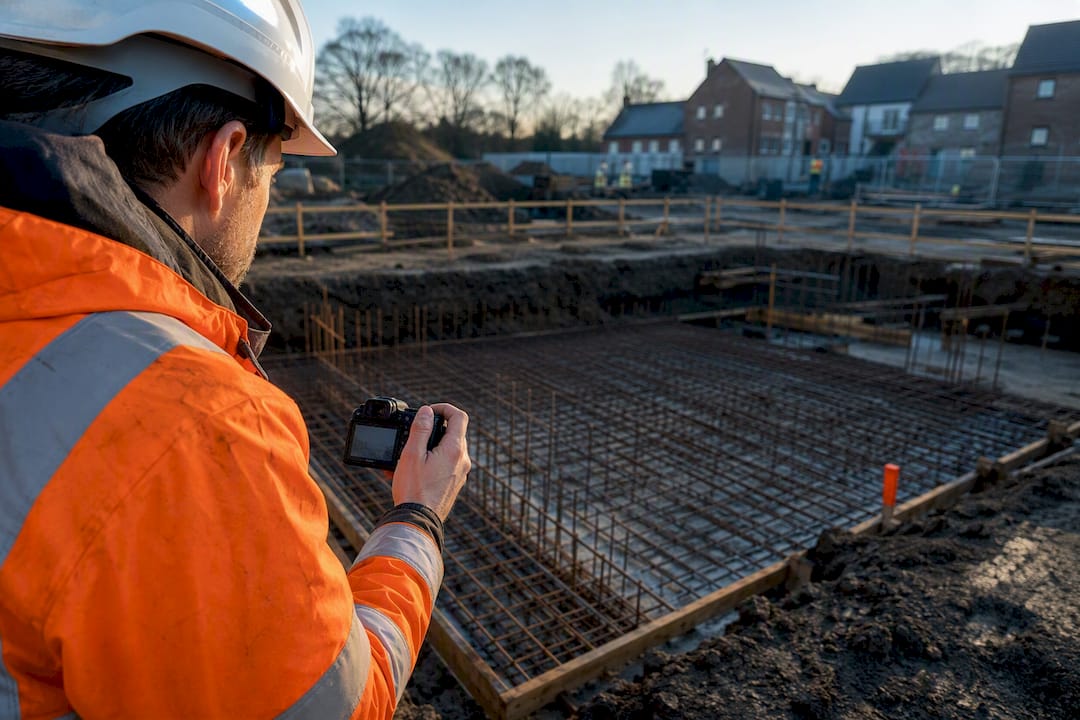
Fix inconsistent progress photos with one change: set a fixed capture cadence, photograph every hold point before it disappears, and preserve the metadata by filing images straight into a project record rather than a camera roll. A tool can do this automatically, timestamping shots and linking them to site diaries as they come in. Do that and two things follow: variations stop getting disputed, and approvals come through faster because the evidence is already there.
TL;DR:
- Consistent photo schedules and fixed camera positions are essential to enable reliable comparison and rapid dispute resolution.
- Photograph key hold points such as foundation work, reinforcement, structural connections, and MEP rough-ins before they are covered.
- Ensure photos include visible scale references, are geotagged, and preserve original metadata to serve as strong legal evidence.
- Organise and back up images systematically by project, date, and trade, linking them to digests, variation records, and site diaries.
- Use automated software like BRCKS to embed metadata, file images properly, and streamline record-keeping, reducing time wasted on manual searches and re-typing.
Table of Contents
- What to photograph and when: the hold points and milestones that matter
- How to capture: cadence, angles, scale and metadata that make photos evidential
- Organising and storing progress photos so teams can find and use them
- Practical workflows and tools that automate photo capture and record‑keeping
- Using photos in progress reports, handover packs and variation evidence
- Photo safety and privacy on site: consent and security
- Progress photos in dispute resolution and legal considerations
- Training site personnel on standardised photo-taking protocols
- Drones and advanced imaging for progress photography
- Author perspective: three mistakes I see on every site
- Turning photos into an auditable project record with BRCKS
- Sources
- FAQ
What to photograph and when: the hold points and milestones that matter
Most disputes on site come down to one thing: nobody photographed the work before it got covered up. Around 40% of rework stems from poor documentation of concealed elements, which means the camera you didn’t pick up costs more than the one you did.
The stages below are the moments that matter most, because once they’re covered, the only record left is whatever you captured.
- Pre-backfill foundations — trench depth, base preparation, drainage runs, before anything gets buried.
- Reinforcement before pour — bar size, spacing, cover, tie positions, before concrete hides the lot.
- Structural connections — steel bolts, timber joints, load paths, at the point of assembly.
- MEP rough-ins before enclosure — pipework, cabling, ducting routes, before boarding or plastering.
- Waterproofing and tanking before coverage — membrane laps, upstands, detailing at penetrations.
- Insulation before boarding — thickness, continuity, gaps at junctions.
- Fire stopping — penetration seals, cavity barriers, before they’re hidden behind finishes.
- Finishes and final handover — the state the client actually signs off on.
Each of these earns its place because it’s either a hold point a building control officer will ask about later, a variation you’ll need to prove, or a detail a future maintenance crew will need to see without opening up a wall. Hidden MEP and subgrade shots save more time than dramatic milestone photos because they’re the ones nobody thinks to take twice.
For cadence: photograph active work areas regularly, and perform periodic walks of the whole site for overview shots, and capture anything unexpected the moment it happens. A leak, a crack, a delivery that turns up damaged. Don’t wait for the end of the shift.
How to capture: cadence, angles, scale and metadata that make photos evidential
A photo without context is just a picture. A photo with a fixed angle, a visible scale, and intact metadata is evidence. The gap between the two is small in effort and huge in value when a variation gets challenged six months later.
Setting a fixed schedule, daily for active areas and weekly for overviews, repeating the same angles each time is the single habit that makes progress genuinely comparable week to week. Pick a mark on the wall, a corner of the plot, a fixed post, and shoot from the same spot every time.
- Take a wide context shot first, then a close-up of the detail that matters.
- Put a tape measure, level staff, or ranging pole in frame for anything where dimension is disputable.
- Enable location services and wait for a GPS lock before shooting. A photo taken before the signal settles can log the wrong spot.
- Keep the original file untouched. Save any cropped or annotated version as a copy, never overwrite the source.
- Avoid messaging apps that strip EXIF data before the photo lands anywhere permanent.
That last point catches people out constantly. Apps built for casual sharing routinely strip GPS and device metadata on the way through, which means a photo that looked perfectly fine on a phone screen has no timestamp and no location by the time anyone needs it as evidence.
Pro Tip: Stamp visible dates on anything you print or send to a client, but keep the untouched original with its EXIF data in your project archive. The visible stamp is for people; the EXIF data is for proving it in a dispute.
Organising and storing progress photos so teams can find and use them
A photo that can’t be found six months later is worthless, no matter how well it was taken. The fix isn’t complicated: a consistent structure, applied every time, without exception.
Organising by project, then date, then phase or trade, with consistent naming and preserved originals is the simplest system that actually holds up under scrutiny. It doesn’t need software to start, but it falls apart fast without discipline.
- Structure folders as project → date → phase or trade, so anyone on the team can find a shot without asking.
- Tag images with the relevant variation or RFI number where one exists, not just a general description.
- Back up to the cloud as photos are taken, not at the end of the week when a phone might already be lost or wiped.
- Set a retention policy that covers at least the warranty period, longer for anything structural or contentious.
- Never rely on a single device or a single person’s phone as the only copy.
Linking photos directly to daily diary entries and variation records is what turns a folder of images into a timeline anyone can follow. Without that link, you’ve got proof something happened, but no proof of when, why, or under whose instruction. That gap is exactly where disputes get traction.
Practical workflows and tools that automate photo capture and record‑keeping
Crews already take photos on WhatsApp. The problem isn’t habit, it’s that WhatsApp strips metadata and buries evidence in a chat thread nobody can search six months later.
BRCKS is built around that exact gap. A crew member snaps a photo the same way they always have, through WhatsApp or the app, and BRCKS captures the metadata, files the image into the correct project diary, tags it by phase or trade, and links it to any related variation or RFI. Nothing changes about how the crew works. What changes is where the evidence ends up.
- Photo-led checklists and snagging, so a hold point gets
Site managers using BRCKS report saving significant time each day that was previously spent chasing photos, re-typing diary notes, or searching through WhatsApp threads for images from previous weeks. That’s not a marketing number, it’s what happens when photo evidence stops living in a chat app and starts living in a searchable project record. For more on the app choices available for this kind of work, see this comparison of construction photo reporting apps, and for the diary side specifically, the site diary app page covers how photos and daily logs connect.
Using photos in progress reports, handover packs and variation evidence
A photo sitting alone in a folder proves nothing to a contract administrator. A photo with a caption, a date, and a link to a variation number proves everything.
- Build before/after sequences for every significant piece of work, attached directly to the diary entry or variation it relates to.
- Write captions that answer four things: who did the work, what it involved, where on site, and why it happened, including the relevant diary or variation reference.
- Use annotated images and side-by-side comparisons when submitting payment claims, since a visual comparison closes arguments faster than a written description ever will.
- Keep two templates ready: a short weekly progress page for clients showing what moved on since last time, and a fuller variation evidence pack for anything likely to be disputed.
Photos used as variation evidence carry far more weight when they’re contemporaneous and tied directly to the variation record rather than pulled together after the fact. A contract administrator reviewing a claim wants to see the photo was taken on the day the work happened, not assembled retrospectively to support an argument. That timing difference is often what separates an approved variation from a contested one.
Photo safety and privacy on site: consent and security
Photographing people on site isn’t the same as photographing concrete. Faces, number plates, and identifiable individuals raise privacy questions that a foundation pour never will.
Where practical, frame shots to capture the work rather than the worker. When a person needs to be in frame for scale or context, make sure your site induction covers photo use so nobody’s surprised to find themselves in a progress report. Subcontractors and visitors should know, before they set foot on site, that photography is part of the daily routine and where those images end up.
Site security matters just as much as consent. Photos showing site layout, access points, security arrangements or valuable plant and materials shouldn’t sit in a public or loosely shared folder. A project system with role-based access, where subcontractors see their own work and clients see approved progress, closes that risk without slowing anyone down. Sharing a raw camera roll over WhatsApp, by contrast, offers no control over who forwards what.
Keep a simple rule for anything sensitive: if a photo reveals something a competitor, trespasser or insurer shouldn’t see, it doesn’t go on a general chat thread. It goes into the project record with access limited to people who need it. That’s a small discipline, but it’s the difference between a photo library that protects the project and one that quietly exposes it.
Progress photos in dispute resolution and legal considerations
When a variation ends up in front of an adjudicator or a contract administrator, the photo with the clearest timestamp and the strongest chain of custody usually wins. Nobody argues successfully against a dated, geotagged image tied to a diary entry.
Preserve the chain: original file, unedited, with EXIF timestamp and GPS intact, filed against the correct diary date the day it was taken. Never edit the source file directly. If you need to annotate or crop for a report, do it on a copy and keep the original as the record of what was actually captured on site.
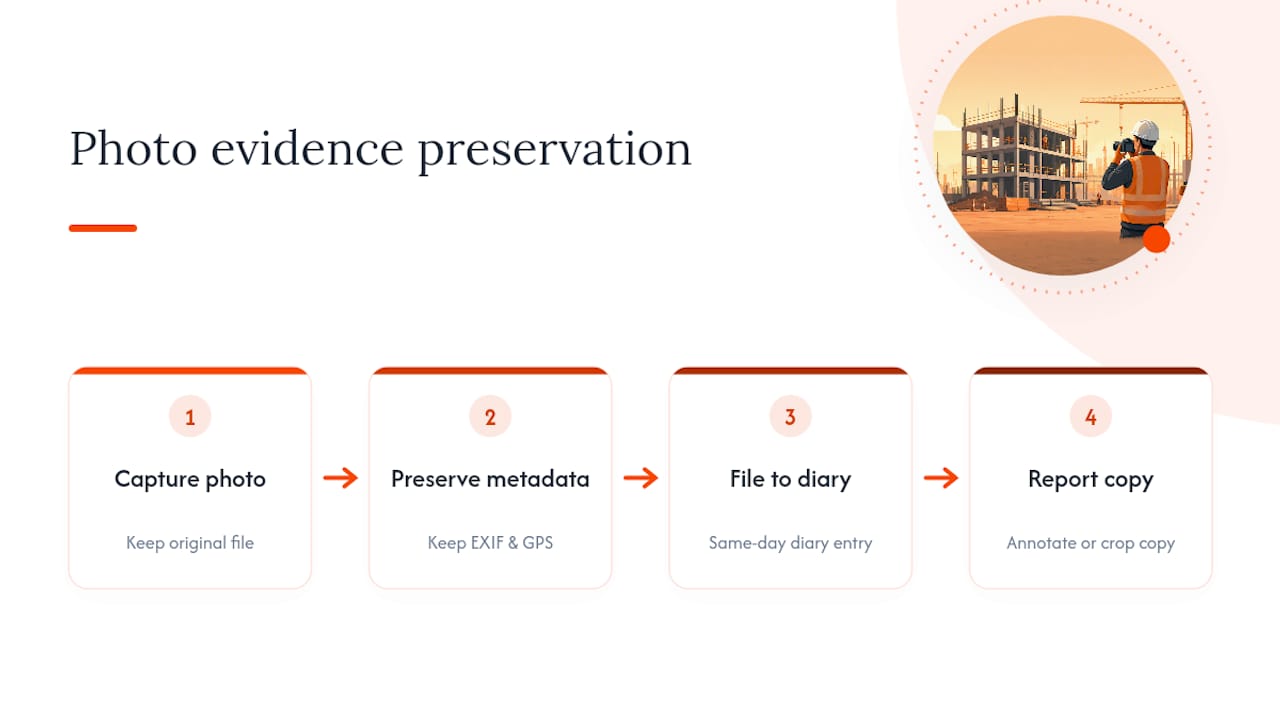
Metadata integrity is the part that gets challenged most often. A photo pulled from a messaging thread with no location data and a “sent” timestamp instead of a “taken” timestamp is weaker evidence than one filed straight from the camera into a project system. If a dispute reaches adjudication, the party with a consistent, unbroken photo timeline usually spends less time arguing and more time getting paid.
None of this replaces proper legal advice on a live dispute. Treat consistent photo practice as the groundwork that makes a legal case easier to build, not as a substitute for one.
Training site personnel on standardised photo-taking protocols
A photo protocol that lives in one person’s head doesn’t survive staff changes, subcontractor turnover, or a busy Friday. It has to be written down and repeated until it’s automatic.
Keep the protocol short enough to fit on a laminated card: which hold points must be photographed, what angle to use, whether a scale reference is required, and where the photo goes once it’s taken. New starters and subcontractors should get this at induction, not discover it three weeks in when a foundation photo turns out to be missing.
A quick weekly check works better than a lengthy policy document nobody reads. Walk the diary with the team, spot the gaps, and correct them there and then. Photo-led checklists that prompt the crew at the point of work, rather than relying on memory, close most of the gap on their own, because the reminder arrives exactly when the hold point is in front of them.
Drones and advanced imaging for progress photography
Standard photos cover most of what a project needs, but larger or more complex sites benefit from tools that capture the whole picture at once rather than one frame at a time.
Drone photography gives an overview a ground-level camera can’t match: roof coverage, site-wide progress, groundworks across a large plot. Aerial capture combined with ground-level and timelapse footage strengthens final reporting and gives clients a clearer sense of overall progress than static photos alone.
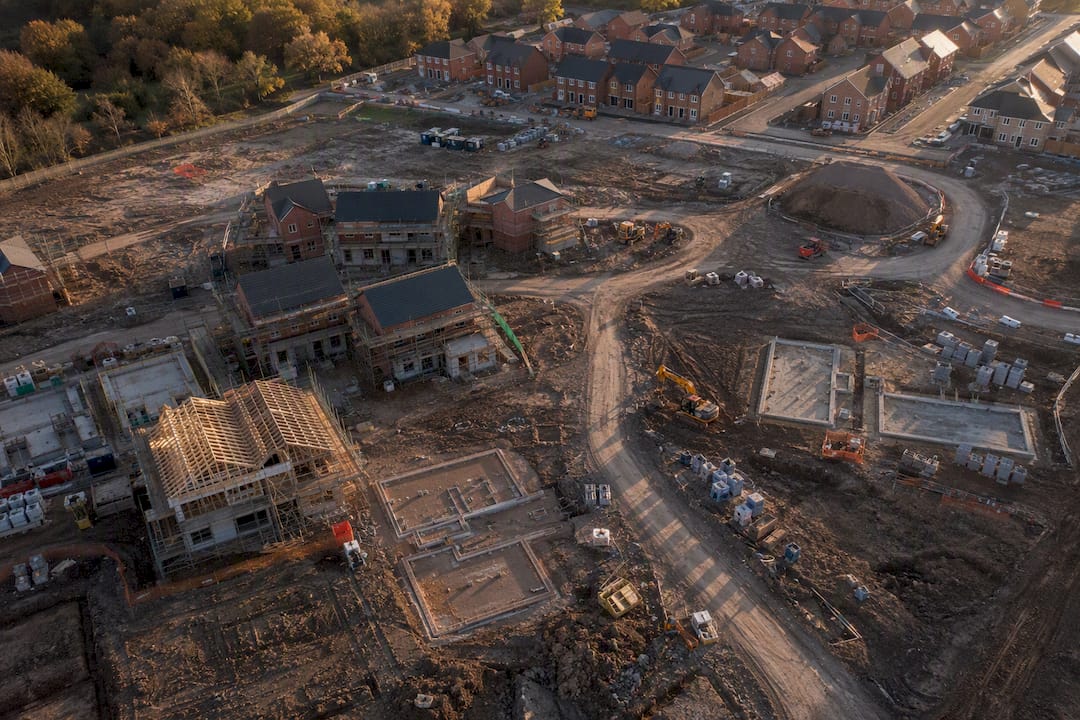
360° capture and digital twin technology go a step further. Recording the full spatial environment rather than single frames lets teams compare site conditions across dates and catch a detail a standard photo would have missed. For a large fit-out or a site with multiple concurrent trades, that fuller record can be the difference between spotting a clash early and discovering it after the walls are closed up.
Neither drones nor 360° scans replace daily hold-point photography. They add an overview layer for handover packs, marketing, and complex snagging, on top of the routine ground-level captures that carry most of the evidential weight.
Author perspective: three mistakes I see on every site
Three things go wrong more than anything else: crews photograph when they remember, not on a schedule; hold points get missed because nobody flagged them in advance; and the photos that do get taken sit on someone’s personal phone, invisible to the rest of the project.
Fix all three and the payoff is immediate: fewer disputed variations, faster sign-off from contract administrators, less rework chasing evidence that was never captured. Start small this week. Pick one fixed camera position on your busiest phase, or set up a single photo-led checklist for your next hold point. That’s the whole fix.
— James
Turning photos into an auditable project record with BRCKS
Most of what goes wrong with progress photos isn’t a camera problem, it’s a filing problem. Photos taken on WhatsApp lose their metadata, sit in a chat thread, and never connect to the variation or RFI they were meant to prove. BRCKS was built by a builder who’d lived that exact frustration for 20 years on site, and it fixes it without asking anyone to change how they work.

Crews keep messaging the way they already do, including through WhatsApp, and the software files every photo into the right project diary, preserves the timestamp and location, and links the image to the variation or RFI it belongs to. Photo-led checklists prompt the crew at the hold point itself, so nothing gets missed while the concrete’s still wet. Site managers report saving time each day that used to go on chasing images and typing up diary notes by hand. Subcontractors and clients join free; only core team seats are billed on a subscription basis.
If you’re managing sites where disputed variations and missing evidence keep costing you time, see how the site diary app handles photo capture, or start a free 14-day trial through the builders page to see it running against your own projects this week.
Sources
- Best practices for construction site photo documentation | OpenSpace
- Construction stage photography case study | PropertyPhotoguy
- The construction progress documentation playbook | Matterport
FAQ
What are progress photos?
Progress photos are dated, timestamped images that record the state of construction work at a given point, used to prove what was built, when, and to what standard, particularly for work that later gets covered up.
What are the 7 stages of a construction project?
Most projects move through pre-construction, groundworks and foundations, structural framing, MEP rough-ins, enclosure and weatherproofing, interior finishes, and final handover, though phase names vary by contract and building type.
How do you make a construction progress report?
Pull dated photos linked to diary entries and variations, group them into before/after sequences with short captions covering who, what, where and why, and present them alongside a brief written summary of work completed that week.
What is the best way to take progress photos?
Set a fixed schedule, daily for active work areas and weekly for full-site overviews, repeat the same camera angles each time, and capture a wide shot plus a close-up with a visible scale reference for anything dimensionally disputable.
Can BRCKS replace WhatsApp for site photos?
BRCKS doesn’t replace WhatsApp, it works alongside it. Crews keep messaging as normal while BRCKS files the photos into the project diary automatically, preserving metadata that a standard chat thread would otherwise strip.
Recommended
- Construction Project Communication Software
- 3 Best Construction Photo Reporting App Alternatives 2026
- Why 68% of UK Residential Construction Projects Go Over Budget (And How to Stop It)
- Real-Time Updates in Construction: Boosting Project Success
How BRCKS Can Help
Eliminating rework is essential for maintaining healthy margins, and consistent visual documentation is the most effective way to catch errors before they become costly. BRCKS simplifies this process by providing a centralised platform where teams can capture, organise, and share progress photos in real time. By integrating these visual records directly into your project management workflow, BRCKS ensures your entire site team stays aligned and accountable. We invite you to explore how our software can streamline your documentation and protect your bottom line today. Learn more at BRCKS and explore our full feature set.