Streamline on-site collaboration: a practical workflow guide
Discover a structured workflow for on-site collaboration to boost communication, avoid missteps, and enhance project delivery on UK construction sites.
By James Shorter ·
Streamline on-site collaboration: a practical workflow guide
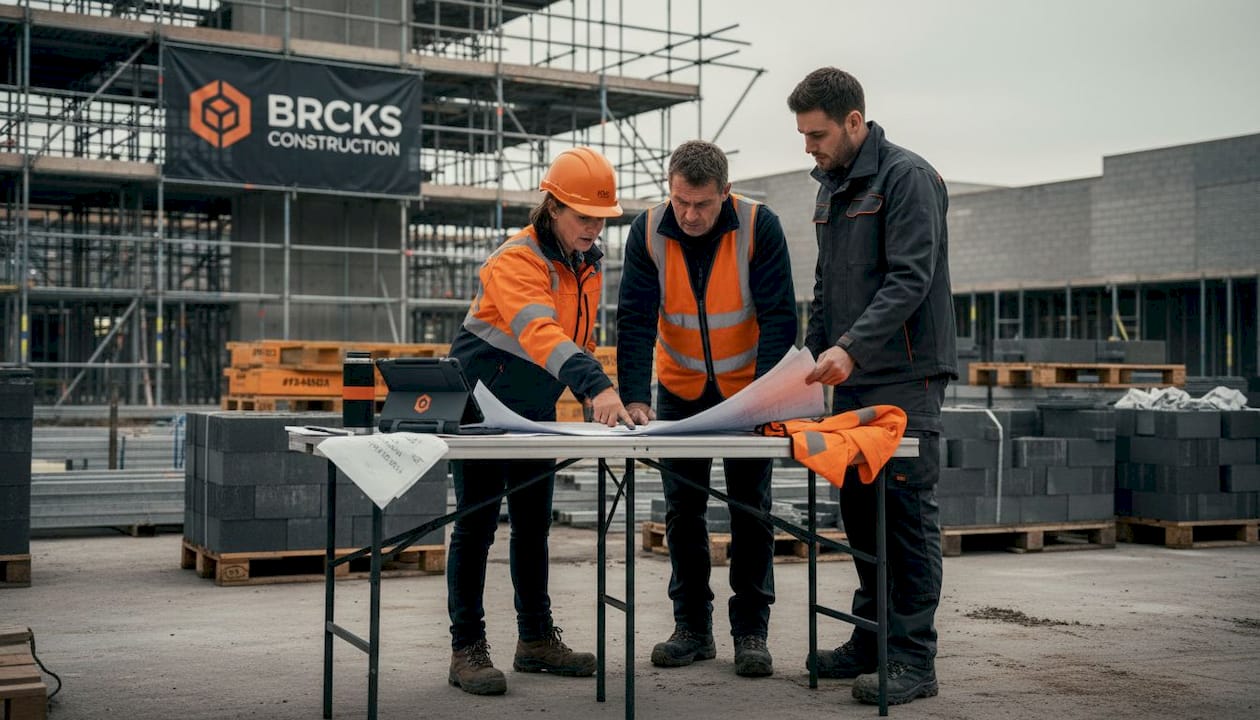 A purpose-built construction snagging software keeps these items tracked through to sign-off.
TL;DR:
- Miscommunication on construction sites leads to costly rework, delays, and team frustration, but structured workflows and the right tools can prevent most issues. Effective collaboration relies on early problem identification, clear responsibilities, offline-capable digital platforms, and daily huddles, rather than overcomplexity or excessive software. Continuous monitoring, feedback, and simplicity in processes are essential to improving site productivity and ensuring successful project delivery.
Miscommunication on a building site is rarely a minor inconvenience. When a subcontractor acts on an outdated drawing, or a delivery arrives because nobody flagged a schedule change, the consequences show up immediately in rework costs, delayed handovers, and frustrated teams. The good news is that these problems are not inevitable. A structured, repeatable collaboration workflow, backed by the right tools and habits, can prevent most of them before they start. This guide gives you a clear, practical path to better on-site communication and more efficient project delivery.
Table of Contents
- Identifying common bottlenecks in on-site collaboration
- Essential tools and prerequisites for seamless teamwork
- Step-by-step workflow for on-site collaboration
- Handling on-site challenges and common mistakes
- Verifying success and iterating your on-site workflow
- Why most on-site workflows fail—and what actually works
- Take collaboration further with tailored construction software
- Frequently asked questions
Key Takeaways
| Point | Details |
|---|---|
| Map bottlenecks early | Using process mapping before team huddles uncovers delays before they escalate. |
| Use workflow structure | Applying step-by-step methodologies like LPS keeps on-site teams aligned and accountable. |
| Select right tools | Combining offline-capable apps with collaboration software ensures seamless communication even during connectivity issues. |
| Review and improve | Frequent feedback and metric tracking are key for long-term gains in site efficiency. |
Identifying common bottlenecks in on-site collaboration
With the main challenge established, let us look at how to pinpoint issues before they impact progress. Most project managers know their sites have communication problems. Fewer know exactly where those problems originate or how to address them systematically.
The most common bottlenecks on UK construction sites include:
- Information delays: Updated drawings or instructions that sit in someone’s inbox rather than reaching the operative who needs them.
- Approval hold-ups: Site activities stalled while waiting for a sign-off that could have been requested days earlier.
- Resource clashes: Two trades competing for the same space or crane at the same time because nobody checked the programme.
- Unclear responsibilities: Tasks that fall between subcontractors because ownership was never clearly assigned.
These are not new problems, but they compound quickly. A single approval delay can push a subsequent trade out of sequence, triggering a cascade of rescheduling across multiple weeks.
Process mapping reveals bottlenecks before huddles, and the Last Planner System’s MakeReady process clears constraints weeks ahead of time to enable reliable weekly commitments. In practical terms, this means drawing your workflow on paper or a digital board, marking every point where information must transfer from one person or team to another, and then asking: what could block this transfer? That exercise alone surfaces most of your critical constraints.
Reducing errors through information sharing is one of the highest-value activities a project manager can invest in, and it begins with understanding where information currently gets stuck.
“The best time to identify a constraint is three weeks before it becomes a problem, not three hours before the task is due.” This is the core principle behind MakeReady planning, and it shifts teams from reactive firefighting to proactive coordination.
Pro Tip: Hold a short pre-huddle review every Monday morning. Ask each trade foreman one question: “What could stop you completing this week’s work?” You will uncover hidden blockers before they derail the programme, and you will build a culture where problems get flagged early rather than hidden.
Effective contractor communication is also shaped by the physical environment. Busy sites with multiple subcontractors need clear escalation paths, not just group chats.
Essential tools and prerequisites for seamless teamwork
Once you know what slows your team down, it is time to gather the right tools and set up for success. The temptation is to adopt every available app. Resist it. Complexity is itself a bottleneck.
The categories of tools you genuinely need on a modern UK site are:
- Communication platforms: For real-time messaging, task assignment, and status updates accessible to all trades.
- Document management: Version-controlled drawings and specifications that show who accessed what and when.
- Visual scheduling tools: Digital or physical boards that make the programme visible to everyone, not just the project manager.
- Reporting and checklist apps: For quality inspections, snag logging, and daily diaries.
A critical and often overlooked requirement is offline capability. Many UK sites, particularly groundworks or rural residential schemes, have patchy mobile data. Apps that require a live connection will be abandoned the moment signal drops.
UK pilots involving firms like Mace and Skanska demonstrate that productivity gains come from digital visibility and collaborative planning rather than from adopting the most sophisticated software available. The research is clear: it is the combination of shared information and joint planning that moves the needle, not the features list of any single tool.
| Tool category | Primary function | Offline capability needed? |
|---|---|---|
| Communication platform | Messaging, task updates | Yes |
| Document management | Drawings, specs, RFIs | Yes |
| Visual scheduling | Programme boards, lookahead | Desirable |
| Checklist and inspection | Snag logs, quality checks | Yes |
| Meeting recording | Minutes, action tracking | No |
Physical prerequisites matter as much as software. Every site operative who is expected to use a digital tool needs a device that works in a site environment, sufficient battery life or charging access, and basic training. Skipping any of these three turns a good tool into an unused one.
Explore digital construction solutions and project coordination best practices to understand how leading UK teams are structuring their digital setups.
Integrated project delivery frameworks also emphasise early alignment on tooling, so that all parties, including subcontractors, are set up before work begins rather than mid-project.
Pro Tip: Before rolling out any new platform to the full team, identify two or three engaged users, often a foreman and a site manager, and pilot the tool with them for two weeks. Their feedback will surface usability issues, and their endorsement will accelerate broader adoption.
Step-by-step workflow for on-site collaboration
With your team equipped, here is how to execute a structured and effective workflow on site. The Last Planner System gives us a proven framework: lean methodologies like LPS structure collaboration through milestones, phase planning, lookahead schedules, weekly work plans, daily huddles, and learning cycles.
Here is how to implement this in practice:
- Set milestones: Define the major project commitments, handoverdates, key inspections, and stage completions. Make these visible on a shared digital or physical board.
- Run phase planning sessions: Bring trades together to plan backwards from each milestone. Identify dependencies and agree on the sequence of work. This is a collaborative session, not a top-down instruction.
- Prepare a six-week lookahead: For each of the next six weeks, list every task, identify constraints, and assign owners who will resolve those constraints before the work week arrives.
- Confirm weekly work plans: Each Monday, agree on a realistic plan for the week ahead. Tasks should only enter the weekly plan if constraints have been cleared.
- Hold daily huddles: Brief, fifteen-minute stand-ups at the start of each shift. Review what was completed yesterday, confirm today’s plan, and surface any emerging blockers.
- Run learning cycles: At the end of each week, review your Percentage Plan Complete score. Ask why tasks were not completed and use those answers to improve the next week’s planning.
| Aspect | Structured workflow (LPS) | Ad hoc approach |
|---|---|---|
| Problem visibility | Constraints identified weeks ahead | Problems surface on the day |
| Team coordination | Joint planning sessions | Instructions passed top-down |
| Schedule reliability | High, with weekly review | Variable, often reactive |
| Rework rate | Lower, due to early constraint clearing | Higher, due to late information |
| Crew engagement | Active participants in planning | Passive task recipients |
Implementing a construction communication workflow that follows this structure can cut rework significantly. Teams using mobile collaboration apps alongside LPS have also recorded meaningful reductions in material waste.
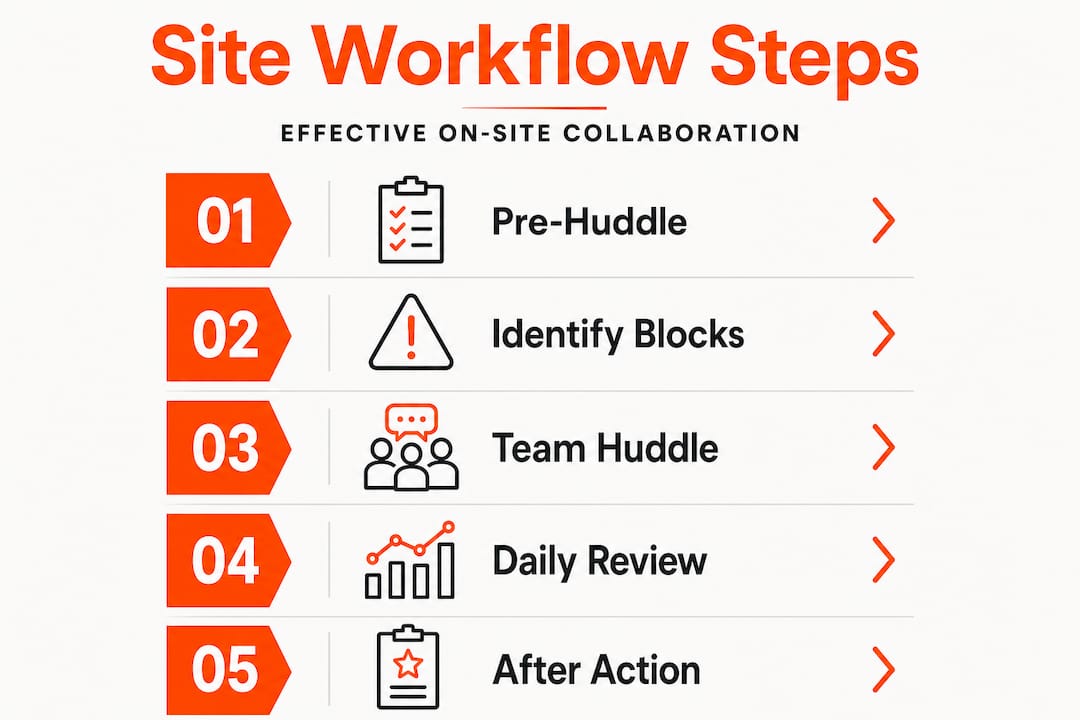
Pro Tip: Use daily huddles not just to confirm the plan but to track site conditions actively. If a concrete pour is running late or a delivery has been pushed back, you have fifteen minutes at the start of every day to redistribute labour and avoid a dead half-shift.
Handling on-site challenges and common mistakes
No workflow is immune to problems. Here is how to tackle them as they arise.
Connectivity outages are one of the most common disruptions on UK sites. When your site loses mobile data, paper-based fallbacks and offline-capable apps become essential. Poor connectivity requires offline apps, and weather events or crane downtime need proactive constraint logging in LPS so that the team knows what to do when conditions change.
Equipment failure should be planned for, not hoped against. Keep a short list of backup procedures: which tasks can proceed without the crane, which can shift indoors during heavy rain, and who holds the authority to make those calls without waiting for a manager.
Common mistakes that undermine even well-designed workflows include:
- Skipping constraint logs: If constraints are not formally recorded and owned, they will not be resolved in time. A verbal “I’ll chase that” is not a constraint log entry.
- Bypassing phase planning: Teams that jump straight to weekly plans without phase planning consistently find themselves reacting to sequencing conflicts that should have been resolved weeks earlier.
- Overloading the weekly plan: Including more tasks than the team can realistically complete destroys trust in the planning process and inflates your Percentage Plan Complete baseline artificially.
- Ignoring weather buffers: British weather is predictable in its unpredictability. Build contingency into your lookahead specifically for weather-sensitive activities.
“A plan without a constraint log is just a wish list.” This is an uncomfortable truth for many sites, but treating constraint resolution as a formal, tracked activity is what separates reliable programmes from optimistic ones.
When things do go wrong, understanding why digital collaboration fails is as valuable as knowing what works. Similarly, strong document control strategies prevent version confusion, which is one of the most common sources of costly rework on UK sites.
Following site management best practice also means building escalation protocols so that any operative can flag a safety or quality issue without needing to find their manager in person.
Verifying success and iterating your on-site workflow
Once your workflow is in place, monitoring and continuous improvement ensure real long-term value. Measuring whether your collaboration improvements are working does not require sophisticated analytics. Start with three simple metrics:
- Rework rate: Track the number of tasks that had to be repeated due to errors or missing information. This should fall as your communication workflow matures.
- Timely completion rate: What percentage of tasks agreed in the weekly work plan were completed by the end of the week? This is your Percentage Plan Complete, and it is the core LPS health indicator.
- Team engagement: Are operatives attending huddles, contributing to planning sessions, and flagging constraints proactively? Engagement is a leading indicator of workflow health.
Collect feedback through after-action reviews at the end of each project phase. Ask crews what slowed them down, what information they wished they had earlier, and which tools they actually used versus which ones they ignored. Honest answers here are more valuable than any dashboard metric.
Measuring the success of digital tools helps you make evidence-based decisions about which platforms to keep, which to retire, and where to invest further.
Pro Tip: Send a brief digital survey to all trades at the end of each phase, five questions or fewer. Ask specifically about communication clarity, access to information, and planning reliability. The responses will tell you exactly where to focus your next improvement cycle, and the act of asking signals that leadership values their input.
Why most on-site workflows fail—and what actually works
Let us examine why even well-intentioned workflows often fail, and what truly drives progress on British sites.
The most common failure pattern is not resistance to change. It is overcomplication. Teams adopt three communication tools, two scheduling apps, and a document management system, then wonder why operatives revert to WhatsApp messages and paper notes. Every additional tool that requires separate login, separate training, and separate maintenance is a tool that most operatives will quietly stop using within a month.
UK pilot programmes are instructive here. The sites that achieved genuine productivity gains did not win through technology. They won through visibility and joint planning. When everyone on site could see the same programme, understand the same constraints, and participate in the same planning conversations, output improved. The software was the enabler, not the driver.
The most counterintuitive lesson from real UK project experience is this: the quality of your daily fifteen-minute huddle matters more than the sophistication of your project management platform. A team that meets every morning, speaks honestly about blockers, and adjusts together will outperform a team with a premium tool that nobody opens.
Common collaboration pitfalls almost always trace back to habits, not hardware. Focus your energy on building the routine of constraint logging, the discipline of MakeReady checks, and the culture of early problem flagging. Once those habits are embedded, any capable platform will amplify them. Without them, the best software in the market will sit unused.
The warning against overengineering your workflow is worth taking seriously. Stick with processes your teams will actually follow on a cold Wednesday morning in February, not the ones that look impressive in a project initiation document.
Take collaboration further with tailored construction software
Ready to put a smarter collaboration workflow into action? The principles in this guide work best when your team has a single platform that brings communication, task management, document sharing, and client updates together in one place.

BRCKS is built specifically for construction teams across the UK. Whether you are managing a small residential build or coordinating multiple subcontractors on a larger commercial scheme, BRCKS for builders gives your team the tools to plan, communicate, and deliver without the friction of switching between apps. The platform integrates with WhatsApp, supports offline access, and automates routine updates so your team saves over two hours every day. Explore construction communication tools designed around how sites actually operate, and find out why teams choose BRCKS to simplify their collaboration from day one.
Frequently asked questions
What is the Last Planner System and why is it effective for on-site collaboration?
The Last Planner System structures collaboration through milestones, phase planning, lookahead schedules, weekly work plans, and daily huddles, giving teams a reliable framework to coordinate, anticipate problems, and make and keep commitments consistently.
How can teams manage poor connectivity on construction sites?
Teams should select apps with offline capability so that information is stored locally and accessible without a live connection. Proactive constraint logging also ensures that weather events or equipment downtime do not halt planning entirely.
What is the role of process mapping before team huddles?
Process mapping identifies where information transfers are most likely to fail, allowing teams to clear constraints before they reach the weekly work plan and protecting the reliability of daily commitments.
How do you measure the impact of improved on-site collaboration?
Track your Percentage Plan Complete each week alongside rework rates and crew attendance at planning sessions. Consistent improvement across all three indicates that your collaboration workflow is genuinely taking hold rather than just being performed for management.
Are there UK examples of successful digital collaboration pilots?
Yes. UK pilots with firms including Mace and Skanska show that combining digital visibility with collaborative planning, rather than deploying tools in isolation, is what delivers measurable productivity improvements on site.
Recommended
- Streamline Plumbing Project Workflows | BRCKS | BRCKS
- The Ultimate Guide to Construction Time Tracking | BRCKS
- Top Construction Schedule Software for UK Builders 2025 | BRCKS
- BRCKS | Construction Project Communication Software
How BRCKS Can Help
Mastering on-site collaboration is about more than just communication; it is about ensuring every team member has access to the right information at the right time. BRCKS simplifies this process by centralising your project data and providing a seamless interface for real-time updates between the field and the office. By integrating these workflows into a single platform, BRCKS helps you eliminate delays and keep your projects moving forward with confidence. We invite you to explore how our software can transform your site management and bring a new level of efficiency to your next build. Learn more at BRCKS and explore our full feature set.