What is seamless site-office collaboration?
Learn how integrating on-site activities with office management through digital tools and physical workspaces can eliminate project delays and improve coordination.
By James Shorter ·
What is seamless site-office collaboration?
TL;DR:
- Seamless site-office collaboration integrates construction activities with project management through physical spaces and digital tools to improve efficiency. It reduces delays, enhances document control, and fosters real-time communication between site and office teams. Successful implementation depends on reliable infrastructure, aligned workflows, leadership commitment, and choosing tools suited to site conditions.
Seamless site-office collaboration is the practice of integrating on-site construction activities with office-based project management through dedicated workspaces and digital communication tools to ensure efficient, real-time coordination and document control. When this integration works well, decisions get made faster, documents stay protected, and nothing falls through the cracks between the team on the ground and the team behind the desk. For construction professionals, this is not a nice-to-have. It is the difference between a project that runs on schedule and one that haemorrhages time and money through miscommunication. This article covers the physical, digital, and strategic components you need to make it work.
What is seamless site-office collaboration in construction?
Site-office collaboration, in industry terms, refers to the coordinated exchange of information, decisions, and documentation between field-based construction teams and office-based project managers. The “seamless” element means that exchange happens without friction, delay, or information loss, regardless of where each person is working.
The core components are three: a reliable physical site office, digital communication tools, and defined workflows. Remove any one of them and the system breaks down. Cloud-based platforms like Microsoft Teams and SharePoint, combined with high-speed site connectivity such as Wi-Fi or 5G, give teams real-time access to design documents and communication channels, directly reducing project delays.
The benefits of site-office collaboration are concrete: fewer delays, better document control, faster RFI responses, and clearer accountability. Projects with structured collaboration frameworks consistently outperform those relying on ad hoc email chains and WhatsApp threads.
What role does the physical site office play?
A physical site office is the project’s operational nerve centre, providing a consistent point of contact for all stakeholders and reducing confusion as project complexity grows. This is not just about having a desk on site. It is about creating a controlled environment where critical work can actually get done.
The practical benefits are significant:
- Document security: Centralising RFIs and change orders in a site office prevents document loss and damage during adverse weather, maintaining operational continuity.
- Team coordination: Dedicated site offices provide better team coordination, more organised operations, and a stable environment for record-keeping and compliance checks.
- Focused work environment: Climate and acoustic control are non-obvious but critical requirements. A quiet, stable environment reduces errors in document-intensive tasks like RFI reviews and contract administration.
- Flexibility: Modular and portable site offices allow teams to relocate the nerve centre as the project progresses, without losing operational continuity.
The acoustic point deserves more attention than it usually gets. Reviewing a complex variation order in a noisy welfare cabin is a recipe for mistakes. A properly specified site office with acoustic insulation removes that risk entirely.
Pro Tip: When specifying a portable site office, prioritise acoustic insulation and climate control over square footage. A smaller, quieter space produces better administrative output than a larger, noisier one.
How do digital tools enhance site-office teamwork?
Digital communication tools are the connective tissue between the site office and the main office. Without them, even the best-organised physical setup produces information silos. Modern office environments are hybrids of physical and digital spaces, requiring support for both synchronous and asynchronous work because teams are rarely all online at the same time.
The most effective site-office communication tools fall into three categories:
- General collaboration platforms: Microsoft Teams and SharePoint handle file sharing, video calls, and task assignment. They work well for office-to-office communication but require discipline to use effectively on site.
- Construction-specific software: Purpose-built platforms handle RFI tracking, variation logs, site diaries, and automated reporting. They are designed around construction workflows rather than adapted from office tools.
- Messaging integrations: WhatsApp is already on every site manager’s phone. The problem is that it creates unstructured, unsearchable records. Platforms that capture WhatsApp communications and convert them into structured project data solve this without forcing teams to change their habits.
Mobile-first interfaces that reduce administrative burden improve adoption and communication quality. This matters because tool fatigue is a genuine problem on site. If a platform requires three logins and four taps to log a site update, field teams will revert to WhatsApp within a week.
Cloud-based collaboration accelerates idea exchange, decision-making, and project tracking by giving both site and office teams instant access to the same information. The result is faster decisions and fewer costly rework cycles.
Pro Tip: Before selecting a digital collaboration tool, audit how your site teams currently communicate. The best platform is the one that fits closest to existing behaviour, not the one with the longest feature list.
What strategies prevent communication breakdowns?
Communication breakdowns between site and office teams follow predictable patterns: undocumented verbal instructions, version-controlled document confusion, and decisions made without the right people in the loop. The following strategies address each of these directly.
-
Centralise all project documentation. RFIs, change orders, and variation logs must live in one place, accessible to both site and office teams. Shared project dashboards and centralised documents promote transparent project tracking and keep teams aligned without requiring constant check-in calls.
-
Define communication workflows before the project starts. Every team member should know who to contact for which type of issue, and through which channel. Ambiguity here is where delays are born.
-
Use shared calendars for coordination meetings. Regular, scheduled touchpoints between site and office teams prevent the accumulation of unresolved issues. A brief daily or weekly sync is far more efficient than reactive firefighting.
-
Assign a single point of contact for client communications. Clients should not be receiving updates from multiple team members through different channels. A dedicated client portal or a single named contact removes confusion and protects your team from scope creep driven by informal conversations.
-
Log everything in real time. Verbal instructions given on site must be captured immediately. Automated site diaries and real-time project updates create an auditable record that protects all parties if a dispute arises later.
Site-office collaboration methods: a comparison
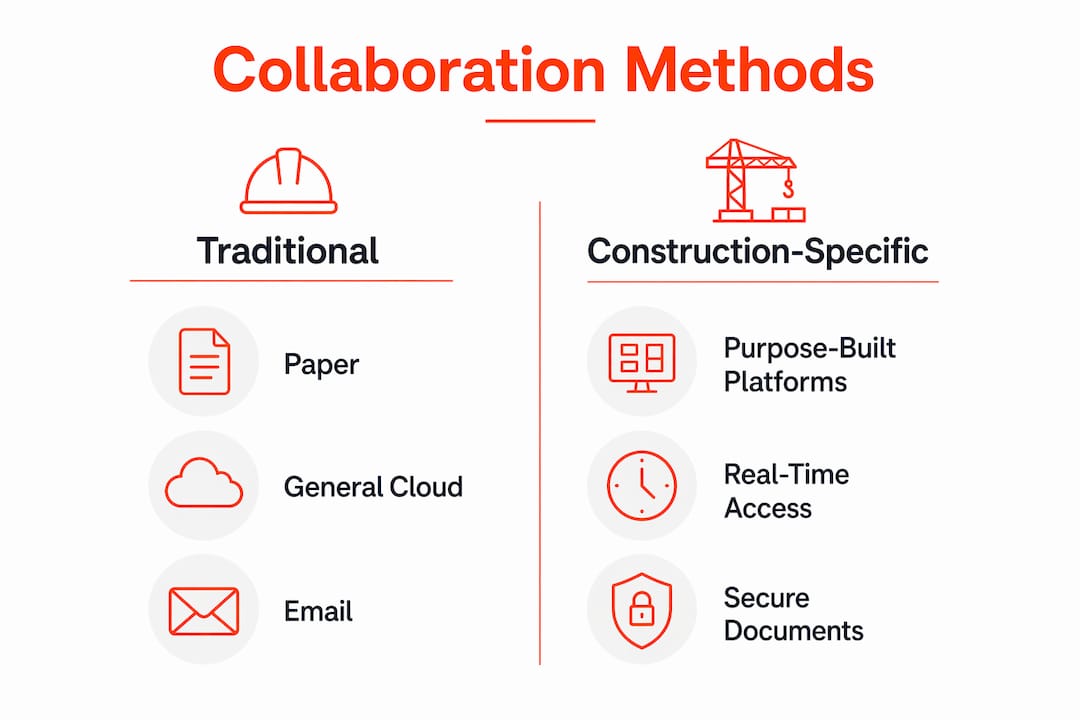
Choosing the right approach depends on your project scale, team structure, and existing workflows. The table below compares the three most common methods.
| Method | Usability on Site | Real-Time Access | Document Security | Best For |
|---|---|---|---|---|
| P |
Paper-based systems fail on document security and speed. General cloud platforms like Microsoft Teams work well for office teams but were not designed for site conditions. Integrated construction software addresses both problems by combining real-time access with construction-specific workflows like RFI tracking, variation logs, and automated site diaries.
The gap between general cloud platforms and purpose-built construction tools is widening. Construction-specific platforms now handle project communication in ways that generic tools simply cannot replicate, particularly around audit trails and regulatory compliance.
How to implement seamless collaboration on your project
Getting site-office collaboration right requires deliberate setup, not just good intentions. Work through these steps before your next project starts.
- Establish reliable site connectivity first. High-speed Wi-Fi or a 5G router on site is the foundation. No digital tool works without it. Budget for this as a project cost, not an afterthought.
- Select one primary collaboration platform and commit to it. Tool proliferation is as damaging as having no tools at all. Pick a platform that covers your core needs: document sharing, RFI tracking, and site reporting.
- Configure your site office for productivity. Ensure the space has adequate lighting, acoustic insulation, and secure document storage. A well-specified site office directly supports the quality of administrative output.
- Train all team members before the project starts. Adoption fails when training happens after problems emerge. Run a short onboarding session covering the communication workflow, not just the software features.
- Review and adjust regularly. Schedule a monthly review of your collaboration processes. Identify where delays are still occurring and trace them back to a process or tool gap.
Following a structured site communication workflow from day one is significantly more effective than retrofitting processes mid-project.
Key takeaways
Effective site-office collaboration requires a physical nerve centre, the right digital tools, and defined workflows working together from project day one.
| Point | Details |
|---|---|
| Physical site office matters | A dedicated, acoustically controlled site office reduces errors and protects critical documents. |
| Digital tools must fit site conditions | Mobile-first, low-friction platforms drive adoption and reduce communication gaps between teams. |
| Centralise documentation | RFIs, change orders, and variation logs must be in one accessible location for both site and office. |
| Define workflows before starting | Clear communication protocols prevent the ambiguity that causes delays and disputes. |
| Review processes regularly | Monthly process reviews identify persistent bottlenecks before they become costly problems. |
What i have learned about site-office collaboration
Having worked across a range of UK construction projects, the pattern I see most often is not a technology problem. It is a culture problem dressed up as a technology problem. Teams invest in Microsoft Teams or a new project management platform, then continue communicating through WhatsApp because that is what they know. The tool sits unused, and the collaboration gap remains.
The projects that get this right share one characteristic: leadership that models the behaviour they expect. When the project manager logs every site update through the agreed platform and responds to RFIs within the system rather than via text message, the rest of the team follows. When leadership bypasses the system, everyone else does too.
The other thing I would push back on is the assumption that more tools equals better collaboration. I have seen site teams drowning in notifications from four different platforms, none of which talk to each other. The result is tool fatigue, missed messages, and a team that has mentally opted out of digital collaboration entirely. One well-chosen platform, used consistently, outperforms a suite of disconnected tools every time.
The physical site office also gets underestimated. Professionals who have worked from a well-specified portable office know the difference it makes to administrative accuracy. Reviewing a complex RFI in a quiet, climate-controlled space produces a better outcome than doing the same task on a phone screen in a noisy welfare unit. Both the physical and digital environments shape the quality of collaboration, and both deserve proper investment.
— James
How BRCKS solves the site-office communication problem
If your team is still managing project communications through WhatsApp threads and email chains, you are creating documentation gaps that will cost you time and money. BRCKS is construction communication software built specifically for UK builders, designed to capture WhatsApp messages and convert them into structured project records automatically.

BRCKS handles automated site diaries, RFI tracking, and variation logs without requiring your site team to change how they communicate. The platform saves users over two hours of manual effort daily and gives clients a dedicated portal so they stay informed without disrupting your workflow. If you want to see what structured site-office collaboration looks like in practice, try BRCKS free for 14 days.
FAQ
What is site-office collaboration in construction?
Site-office collaboration is the coordinated exchange of information, decisions, and documentation between field-based construction teams and office-based project managers. Effective collaboration relies on a physical site office, digital communication tools, and defined workflows working together.
Why does seamless collaboration reduce project delays?
Real-time access to documents and communication channels removes the lag between a decision being made and the site team acting on it. Delays most commonly occur when information is trapped in one location or one person’s inbox.
What are the best tools for site-office communication?
Purpose-built construction platforms that handle RFI tracking, site diaries, and variation logs outperform general tools like email for site-office communication. Platforms that integrate with WhatsApp are particularly effective because they fit existing site team behaviour without requiring new habits.
How do you prevent communication breakdowns on site?
Centralise all project documentation in one platform, define clear communication workflows before the project starts, and schedule regular coordination meetings between site and office teams. Logging decisions in real time creates an auditable record that prevents disputes later.
What makes a site office effective for collaboration?
A well-specified site office provides acoustic and climate control, secure document storage, and reliable connectivity. These conditions directly improve the accuracy of administrative tasks and support focused coordination work.
Recommended
- Meaning of Project Collaboration for Site Teams | Brcks
- Site Communication Workflow: UK Project Manager’s Guide | BRCKS
- Streamline UK Construction Communication & Workflows
- BRCKS | Construction Project Communication Software
How BRCKS Can Help
Achieving seamless site-office collaboration is no longer a luxury but a necessity for modern construction projects looking to avoid costly delays and miscommunication. By centralising real-time data and streamlining communication channels, BRCKS bridges the gap between the field and the desk, ensuring everyone stays aligned on a single version of the truth. Our platform simplifies these complex workflows so your team can focus on delivering quality work rather than chasing updates. We invite you to explore how BRCKS can transform your project management and bring a new level of efficiency to your next build. Learn more at BRCKS and explore our full feature set.