Construction file sharing guide: Streamline collaboration in the UK
Streamline your UK construction projects with our guide to professional file sharing, ISO 19650 standards, and robust version control strategies.
By James Shorter ·
Construction file sharing guide: Streamline collaboration in the UK

TL;DR:
- Proper file sharing systems reduce errors, save time, and ensure everyone works with the latest documents.
- Establish clear naming conventions, roles, and permissions aligned with ISO 19650 standards.
- Using dedicated construction platforms with audit trails and secure access is essential for project success.
Scattered drawings, misnamed files, and documents buried in email threads cost UK construction projects far more than most teams realise. When your site manager is working from a superseded drawing, or a subcontractor cannot find the latest specification, mistakes follow and budgets suffer. The good news is that the right file sharing approach can transform this chaos into a structured, auditable workflow. Digital tools cut admin by 90% on projects like those managed by Eurovia, proving that efficiency gains are very much achievable. This guide walks you through every step, from laying the groundwork to advanced cloud strategies, so you can run leaner, more accurate projects.
Table of Contents
- Preparing your construction file sharing foundation
- Setting up a robust file structure and version control
- Managing sharing, permissions, and security
- Advanced tips: Cloud platforms, hybrid approaches, and ongoing improvement
- What most guides miss: Practical realities from the UK construction trenches
- Take your file sharing to the next level with UK-focused construction software
- Frequently asked questions
Key Takeaways
| Point | Details |
|---|---|
| Standardise folder structure | Using ISO 19650 conventions minimises errors and boosts project clarity. |
| Control versions rigorously | Separate drafts and superseded documents to avoid costly rework. |
| Prioritise secure collaboration | Set permissions and audit trails on all shared files for data safety. |
| Leverage cloud and hybrid tools | Digital platforms and hybrid setups ensure fast access and reduced admin. |
Preparing your construction file sharing foundation
Before you touch a single platform or upload your first file, you need to establish the standards and roles that will govern everything. Skipping this step is why most file sharing efforts fail within six months.
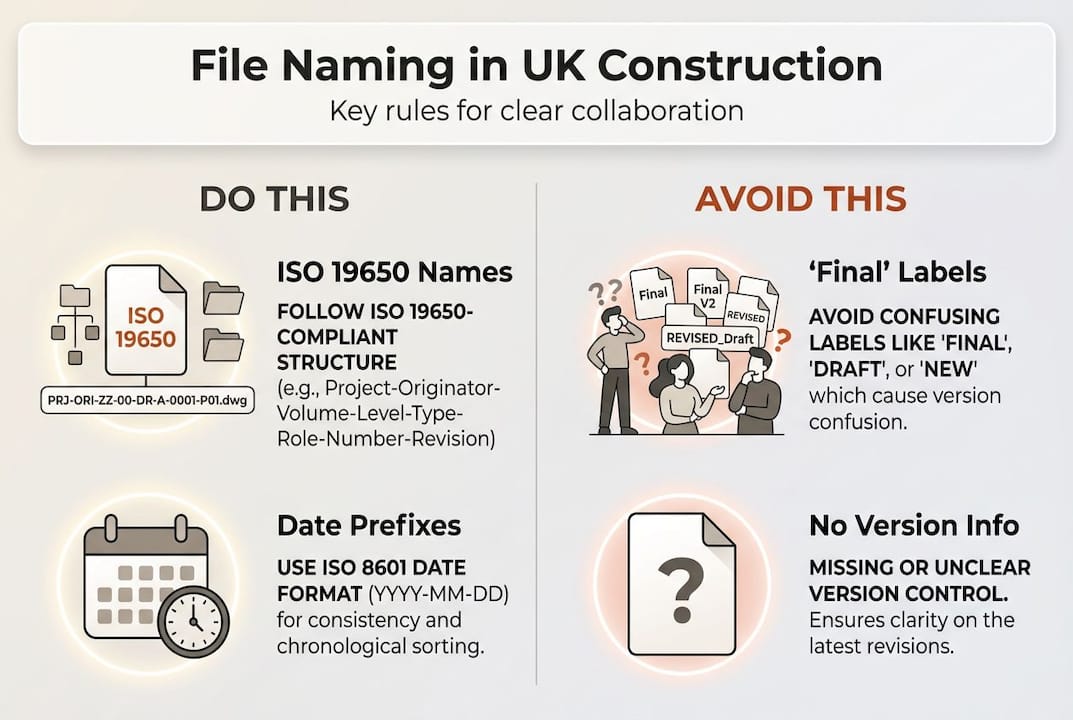
Start with naming conventions. ISO 19650 naming and structure is recommended for UK projects regardless of whether your client mandates it. ISO 19650 is the British and international standard for managing information on construction and infrastructure projects using Building Information Modelling (BIM). Even on smaller builds, following its logic reduces confusion and creates files that anyone on your team can locate within seconds.
Next, assign a document controller. On most UK sites, the project manager holds this role. That person owns the folder structure, enforces naming rules, and approves version changes. Without a single owner, standards erode fast.
Your recommended top-level folder structure should cover:
- Admin: contracts, insurance, client correspondence
- Design: drawings, specifications, engineer reports
- Site: RFIs, site instructions, inspection records
- Health and Safety: RAMS, permits, induction records
- Handover: O&M manuals, as-built drawings, warranties
When choosing a platform, look for a Common Data Environment (CDE). A CDE is a single source of truth that complies with ISO 19650, allowing all team members to access the same current information. Prioritise UK data compliance, full audit trails, and mobile access for site teams.
| Platform | CDE support | UK data hosting | Audit trail | Best for |
|---|---|---|---|---|
| Procore | Yes | Yes | Full | Large contractors |
| Collabor8online | Yes | Yes | Full | SME builders |
| Autodesk Construction Cloud | Yes | Partial | Full | BIM-heavy projects |
| SharePoint hybrid | Partial | Yes | Partial | Office-centric teams |
Pro Tip: Ban the word ‘final’ from all filenames immediately. It breeds confusion the moment someone edits that file. Use structured naming standards with version numbers instead, such as v01, v02, so everyone knows which file is current without guessing.
Setting up a robust file structure and version control
With your foundation in place, it is time to bring order through consistent folder hierarchies and reliable version control. This is where most teams either build lasting discipline or fall back into old habits.
Follow these steps to implement effective version control:
- Create your top-level folders using the structure above and apply ISO 19650 naming to every file from day one.
- Divide documents into four clear categories: Drafts (work in progress), Current (live, approved version), Superseded (replaced but retained for audit), and Archive (project closed or no longer active).
- Set up a mandatory check-in and check-out process on your platform so no two people overwrite the same file simultaneously.
- When a new version is issued, move the old file to the Superseded folder immediately rather than deleting it. Audit requirements mean you may need it later.
- Communicate every version change to affected team members through a controlled notification, not a WhatsApp message.
Document version control in construction works best when you separate current, superseded, drafts, and archives clearly, reducing the risk of someone acting on an outdated drawing.

Comparison: email and WhatsApp versus modern document control
| Criteria | Email/WhatsApp | Modern document control |
|---|---|---|
| Security | Low | High |
| Auditability | Poor | Full trail |
| Finding the latest file | Unreliable | Instant |
| Version control | Manual, error-prone | Automated |
| GDPR compliance | Risky | Built-in |
Common mistakes to avoid include: using ‘final’ or ‘revised’ in filenames without a version number, failing to move superseded documents out of live folders, and storing files across multiple locations such as email, USB drives, and shared drives simultaneously. Managing subcontractor documentation is particularly vulnerable to these errors when there is no central system.
Pro Tip: Automate folder creation and version naming wherever your platform allows. Most modern CDEs offer templates. Set them up once and you remove the risk of human error every time a new project starts.
Managing sharing, permissions, and security
A well-structured filing system is only as secure as its access controls. Once files are organised, you need clear rules about who can view, edit, and share each document.
Set up tiered access levels from the start:
- Administrators: full read/write/delete rights, typically the project manager and document controller
- Internal team members: read/write on relevant folders, no delete rights
- Subcontractors: read-only on drawings and specs, write access only to their submission folders
- Clients: read-only on progress reports and approved documents via a dedicated portal
For any platform you choose, these security features are non-negotiable:
- ISO 27001 certification for the provider
- Full audit trails showing who accessed, edited, or downloaded each file
- UK-hosted data to meet GDPR requirements
- Two-factor authentication for all users
- Automatic session timeout for inactive users
Granular permissions and GDPR compliance are essential on UK projects, with UK data centres and audit trails strongly recommended for any compliant platform.
One fact worth highlighting: teams using effective digital tools cut admin by 90% compared to manual file management methods. That figure reflects real projects, not theoretical gains.
Warning: Never share critical drawings or specifications via email or WhatsApp. Files sent this way become uncontrolled copies instantly. Recipients may act on an outdated version without knowing it, and you lose all audit trail. If an incident occurs on site, you need to prove what information was current and when.
Review permissions at every project milestone. Subcontractors finishing a package should lose write access immediately. New team members should be added only with the correct role assigned from day one. Cutting construction errors with digital tools starts with preventing unauthorised changes at the source.
Advanced tips: Cloud platforms, hybrid approaches, and ongoing improvement
Once your permissions and security are solid, you can look at more advanced strategies to handle complex UK builds, large files, and multi-site operations.
Choosing the right platform depends on your project scale and file types. Procore suits large contractors managing multiple projects with complex workflows. Collabor8online works well for SME builders wanting straightforward compliance. Autodesk Construction Cloud is the choice for BIM-heavy projects where model coordination is central. For teams already invested in Microsoft 365, a hybrid SharePoint and cloud approach can work, though it requires more manual governance.
Cloud-based platforms for mobility are the preferred approach for UK construction, with hybrid cloud and local sync recommended for handling large CAD and BIM files on sites with limited bandwidth.
To onboard a new team effectively onto a cloud platform:
- Set up the project folder structure before anyone else joins.
- Issue each user an account with the correct permissions before day one.
- Run a one-hour induction covering folder structure, naming conventions, and version control rules.
- Provide a one-page quick reference guide accessible from any device.
- Assign a team member to monitor compliance for the first four weeks.
“Redcliffe Homes cut hours from their induction process and built a ten-year audit trail using cloud document management and QR codes on site. What once took days to locate is now found in seconds.” Redcliffe Homes case study
For multi-site UK builds, the benefits of digital solutions become even clearer. A cloud CDE means a site manager in Leeds and a designer in London are always working from the same file, with no emailing of attachments needed. For large CAD or BIM files where bandwidth is an issue, a local sync tool combined with cloud backup keeps everyone current without killing the site Wi-Fi.
Pro Tip: Set a recurring monthly calendar reminder for a file audit. Assign one team member to check naming compliance, archive superseded documents, and review permissions. This single habit will reduce rework from miscommunication more than any software upgrade ever will.
What most guides miss: Practical realities from the UK construction trenches
Most articles about construction file sharing focus heavily on technology and barely mention the human side. That is where projects actually succeed or fail.
No platform fixes a team that has not been trained properly. We have seen firms invest in Procore or Autodesk, spend months on setup, and still find drawings being shared via WhatsApp six weeks later because old habits are easier. The tool is only as good as the team’s discipline. Technology is the vehicle; your processes and culture are the road.
The teams that genuinely succeed treat file management as a core site discipline, not a back-office task. They document every process change in writing, review it in monthly meetings, and hold people accountable in the same way they would for a health and safety violation. Understanding why digital construction collaboration fails usually comes down to skipped training and absent accountability rather than the wrong software choice. Start with the habits. The right platform makes them easier to maintain.
Take your file sharing to the next level with UK-focused construction software
Putting these strategies into practice is easier with UK-focused construction software like BRCKS.

BRCKS brings file sharing, team chat, task management, and client portals into one platform built specifically for construction teams. It is designed to support the kind of structured, auditable file management this guide describes, without the complexity of enterprise tools that require months of setup. UK compliance, full audit trails, and free subcontractor access mean you can roll out proper document control across your entire supply chain from day one. Whether you are comparing construction communication software options or looking for something built specifically for builders on site, BRCKS offers a practical alternative to the scattered tools most teams currently rely on. See how it stacks up against your current setup by exploring the BRCKS comparison.
Frequently asked questions
What is ISO 19650 and why does it matter in UK construction file sharing?
ISO 19650 is the UK and international standard for organising built asset information using BIM. It ensures consistency, reduces errors, and is required for many public sector projects in the UK.
How often should file structures and permissions be reviewed on UK construction projects?
Weekly tidies and monthly checks are the recommended cadence. Weekly reviews catch naming errors early; monthly audits address permissions, version control, and archived files.
Is it safe to share construction documents via email or WhatsApp?
No. Email and WhatsApp create uncontrolled copies instantly, with no version history or audit trail. Always use a controlled document management platform with clear versioning.
What are hybrid file sharing setups and when are they useful?
Hybrid setups combine local file sync with cloud storage, giving site teams fast access to large CAD and BIM files even where internet bandwidth is limited.
Recommended
- BRCKS | Construction Project Communication Software
- BRCKS | Construction Project Communication Software
- Construction Document Management: Solving the £21bn Problem | BRCKS
- UK Construction Project Coordination Best Practices 2026 | BRCKS
How BRCKS Can Help
Effective file sharing is the backbone of any successful UK building project, ensuring that every stakeholder remains aligned and informed. By centralising your documents within BRCKS, you can eliminate the risks associated with outdated versions and fragmented communication. Our platform is specifically designed to simplify these complex workflows, allowing your team to focus on quality delivery rather than administrative hurdles. We invite you to discover how BRCKS can transform your digital collaboration by exploring our features today. Learn more at BRCKS and explore our full feature set.