Site meeting planning guide for UK construction teams
Discover how to run efficient, agenda-driven site meetings with a pre-start walkthrough and clear action logs to prevent costly on-site surprises.
By James Shorter ·
Site meeting planning guide for UK construction teams

Run short, agenda-driven site meetings with a pre-start walkthrough, named actions, and a single source of truth for records. Do that consistently and you will prevent the majority of costly on-site surprises.
Here is what to do right now:
- Issue the agenda at least 48 hours before the meeting, including the previous action log
- Confirm attendees: project manager, site manager, client representative, and principal designer/contractor where CDM 2015 applies
- Complete pre-start checks on access, long-lead items, welfare, and permits before anyone arrives
- Record every decision with a named owner and a deadline
- Issue minutes within 24–48 hours and require corrections within five working days
- Use a site diary app as your single source of truth across all meeting records
Table of Contents
- Who should attend and when should you schedule each meeting?
- What should you prepare before a site meeting?
- How do you run an efficient site meeting with a clear agenda?
- What records should you keep and how do you store them?
- How do you follow up and close out actions after a meeting?
- Ready-to-use templates for pre-starts, agendas and action logs
- Which UK safety and regulatory checks belong in every site meeting?
- Key takeaways
- Why most site meetings fail (and what actually fixes them)
- Two hours of admin saved daily: BRCKS for site meeting workflows
- Useful UK sources and templates
- FAQ
Who should attend and when should you schedule each meeting?
Not every meeting needs the same people. Getting this wrong wastes time and breeds resentment from trades who have no reason to be there.
Meeting types and attendance

Pre-start site meeting (2–4 weeks before mobilisation for domestic projects): project manager, site manager, client representative, principal designer/contractor where CDM applies, and any specialist whose long-lead items affect the programme. Larger projects benefit from a second mobilisation meeting closer to start date. Missing a single logistics detail at this stage can produce a two-week delay and over £4,000 in emergency crane hire or road-closure charges.
Weekly site meeting: PM, site manager, key trade leads, client rep where appropriate, and any specialist with live design or commercial queries. This is the core coordination meeting.
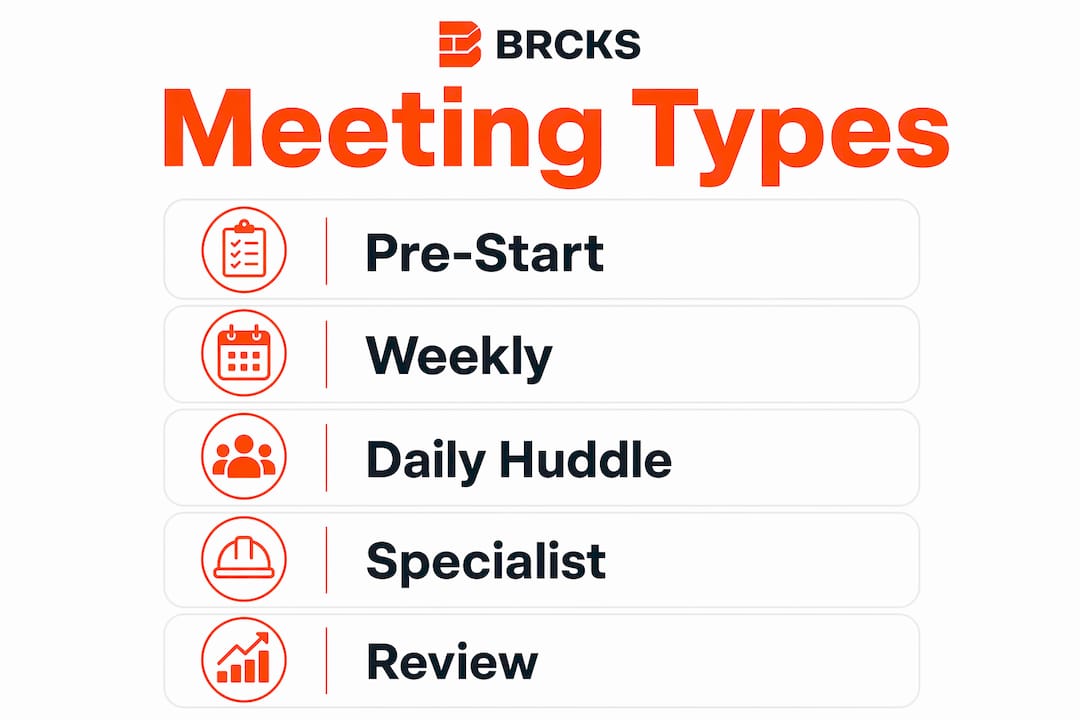
Daily huddle (5–10 minutes): site manager and trade leads only. Reserve these for programmes with high sequencing risk or tight access windows. Keep them standing and off the record.
Specialist stand-downs (crane lifts, traffic management, safety): invite only the relevant parties and chair separately rather than extending the main meeting.
Roles at every meeting
- Agenda owner: project manager prepares and circulates it
- Chair: site manager or PM, depending on project scale
- Minutes taker: a named person, not whoever volunteers on the day
- Action tracker owner: one person holds the log and chases it between meetings
For subcontractor onboarding requirements, the construction team onboarding checklist covers what to confirm before trades arrive on site.
What should you prepare before a site meeting?
Preparation is where most meetings are won or lost. A poorly prepared meeting produces vague discussions; a well-prepared one produces decisions.
- Circulate documents 48 hours ahead: latest drawings, programme, specification, structural calculations, planning and building-control notices, and any live permits.
- Check access and logistics: confirm access routes, delivery and storage locations, skip placement, parking, and any neighbour notifications required.
- Confirm long-lead items: identify which suppliers are critical path and whether any items are at risk of delay.
- Verify utility isolation points: stopcock, gas meter, and consumer unit locations should be confirmed before work starts, not discovered mid-programme.
- Confirm specialist plant: if a crane, traffic management, or hoisting equipment is needed, confirm booking, method statement, and permit requirements before the meeting.
- Circulate trade updates: ask subcontractors to send written updates 24 hours before the meeting so the chair can review them in advance.
Pro Tip: Aim to have at least 80% of product selections finalised before the pre-start meeting. Leaving selections incomplete after mobilisation commonly adds 1–2 weeks and £1,000–£5,000 in unexpected costs for a typical UK residential extension.
The site meeting process guide covers pre-start coordination in more detail for UK projects.
How do you run an efficient site meeting with a clear agenda?
A tight agenda with time allocations turns a meeting from a status update into a delivery tool. Use this as your starting template:
| Agenda item | Time | Expected output |
|---|---|---|
| Attendance and apologies | 2 mins | Confirmed attendees on record |
| Review previous actions | 10 mins | Actions closed, carried, or escalated |
| Health and safety | 10 mins | Observations noted, RAMS confirmed |
| Programme update | 15 mins | Agreed current position and next two weeks |
| Design/RFIs | 10 mins | RFIs raised or closed, decisions recorded |
| Subcontractor reports | 15 mins | Issues flagged, actions assigned |
| Quality and commercial | 10 mins | Variations noted, approvals confirmed |
| Any other business | 5 mins | Parked items logged for follow-up |
| Next meeting confirmed | 2 mins | Date, time, location agreed |
Chairing techniques that keep meetings on track:
- Start on time regardless of who is missing
- Timebox each item and call it when the clock runs out
- Park off-topic discussions in a visible “parking lot” list and address them after the main agenda
- Assign every action with a named owner and a specific date, not “ASAP”
- Summarise decisions aloud before moving to the next item
When a discussion escalates or requires specialist input (a crane lift plan, a structural query), close it in the main meeting and schedule a separate specialist call. Extending the main meeting to resolve it costs everyone else’s time.
Pro Tip: Give each agenda item a required output, not just a topic. “Agree hoist plan” or “issue RFI 14 by Friday” forces a decision rather than a discussion.
What records should you keep and how do you store them?
The minimum record set for any site meeting is straightforward. The discipline is keeping it in one place.
Minimum records to maintain:
- Decisions made (with date and meeting reference)
- Named actions with deadlines and current status
- RFIs raised, responded to, or outstanding
- Variations instructed or under review
- Photo evidence linked to specific agenda items or inspections
- Signed attendance sheet and version-controlled minutes
| Record type | Why it matters | Action frequency |
|---|---|---|
| Meeting minutes | Evidential record of decisions; basis for dispute resolution | Issue within 24–48 hours |
| Action log | Tracks accountability and progress between meetings | Updated at every meeting |
| RFI log | Documents design queries and responses | Updated as raised/closed |
| Variation log | Records scope changes and commercial impact | Updated when instructed |
| Photo log | Visual evidence of progress, quality, and defects | Captured on site daily |
| Site diary | Single source of truth for programme, weather, and labour | Completed daily |
The single source of truth principle matters most here. Minutes linked to a live action tracker, stored in the same project space as your site diary, means nothing falls through the gaps between meetings.
Digital workflows that push WhatsApp updates directly into the project record cut the time spent preparing minutes and chasing actions significantly. The site communication workflow guide explains how to set this up for a UK project.
Pro Tip: Write a short summary within two hours of the meeting while decisions are still fresh. Full minutes can follow within 24–48 hours, but the two-hour summary locks commitments before anyone’s memory shifts.
How do you follow up and close out actions after a meeting?
Agreed actions that are never chased are the single biggest reason the same issues appear at every meeting.
Action log essentials:
- Action description (specific and measurable)
- Named owner
- Due date
- Current status (open/in progress/closed)
- Evidence field (photo reference, RFI number, or written confirmation)
Follow-up cadence:
- Send a short summary email within two hours of the meeting
- Issue formal minutes within 24–48 hours; give recipients five working days to submit corrections before minutes are considered agreed
- Check critical actions mid-cycle, not just at the next meeting
- Escalate persistent non-performance: note it in the next meeting, then escalate to management, then to the contract dispute process if unresolved
Chase the owner directly, not the group. A broadcast message to all attendees dilutes accountability and produces no result.
Sample follow-up email structure:
Ready-to-use templates for pre-starts, agendas and action logs
Short templates that site teams will actually use beat comprehensive ones that gather dust.
| Template | Purpose | Who fills it | When to send |
|---|---|---|---|
| Pre-start checklist | Confirm access, long-lead items, welfare, permits, approvals | PM or site manager | 48 hours before pre-start |
| Meeting agenda | Set agenda items, time allocations, expected outputs | PM (agenda owner) | 48 hours before meeting |
| Minutes and action log | Record decisions, owners, deadlines, status, evidence | Minutes taker | Within 24–48 hours after meeting |
| Follow-up summary email | Lock commitments immediately after meeting | Chair | Within 2 hours of meeting |
Pre-start checklist snippet (copy and adapt):
- Access confirmed: vehicle dimensions, height restrictions, turning circles
- Long-lead items: supplier confirmed, lead time on programme
- Welfare: toilets, welfare cabin, first aid kit, water supply
- Permits: skip licence, hoarding licence, scaffold licence, road closure if required
- Approvals: building-control notice submitted, planning conditions reviewed, party-wall agreement served where required
- Product selections: at least 80% confirmed
Keep templates to one page. A two-page checklist that takes ten minutes to complete will be skipped; a half-page one that takes two minutes will be used every time. For homeowner-facing pre-start items, a free homeowner checklist can help set client expectations before the meeting.
Which UK safety and regulatory checks belong in every site meeting?
Site meetings are the right place to confirm statutory responsibilities, not discover them.
- CDM 2015: confirm the principal designer and principal contractor are appointed where the project has more than one contractor. Review their responsibilities at the pre-start meeting and record confirmation in the minutes. Check the HSE CDM guidance for current requirements.
- HSE guidance: for high-risk activities (working at height, excavations, crane lifts, confined spaces), confirm that method statements and risk assessments are in place before work starts. HSE publishes specific guidance at hse.gov.uk/construction.
- Building-control notifications: confirm that the building-control body has been notified at the correct stages (commencement, foundations, damp-proof course, structural elements, completion). Check your local authority’s planning portal for any conditions affecting working hours or temporary works.
- Gas Safe certification: confirm that any gas work is carried out by a Gas Safe registered engineer and that certificates are issued and stored.
- Part P electrical work: confirm that notifiable electrical work is carried out by a competent person or notified to building control.
- Party-wall agreements: where applicable, confirm that the party-wall surveyor has issued the award and that a copy is on site.
This is general guidance only. Confirm current requirements with HSE, your local authority, or a qualified professional for your specific project.
Key takeaways
Effective site meetings come down to three habits: prepare thoroughly before the meeting, make decisions during it, and close actions after it.
| Point | Details |
|---|---|
| Issue the agenda early | Circulate the agenda and previous action log at least 48 hours before every meeting. |
| Confirm pre-start logistics | Check access, long-lead items, welfare, and permits before mobilisation to avoid costly surprises. |
| Record decisions, not discussion | Minutes should capture decisions, named actions, and deadlines only — issue within 24–48 hours. |
| Chase actions mid-cycle | Send a summary within two hours and check critical actions before the next meeting, not at it. |
| Use BRCKS for automated records | BRCKS automates site diaries, RFI logs, and WhatsApp-captured updates to cut daily admin. |
Why most site meetings fail (and what actually fixes them)
The conventional wisdom is that meetings fail because people are unprepared or disorganised. That is partly true, but the deeper problem is structural: most site meetings have no clear output requirement per agenda item, and no single person who owns the record after the meeting ends.
Structured meetings provide continuity, accountability, and the evidential basis for dispute resolution. The meeting itself is almost secondary to what happens before and after it. A sharp pre-start that confirms access, long-lead items, and product selections prevents the kind of last-minute crane hire that costs over £4,000 and a two-week delay. A two-hour summary email locks decisions before anyone’s recollection shifts. A live action tracker means the next meeting starts with closed items, not repeated ones.
The tools matter less than the discipline, but the right tools do remove friction. Combining a structured site diary workflow with WhatsApp-integrated updates means the record builds itself in real time rather than being reconstructed from memory on a Friday afternoon. That shift alone changes how meetings feel to the people attending them: less admin, more accountability.
For meeting management tips specific to UK contractors, the BRCKS blog covers chairing techniques and action-tracking in more detail.
Two hours of admin saved daily: BRCKS for site meeting workflows
Site teams using BRCKS report saving over two hours of manual effort daily by replacing scattered WhatsApp threads and paper diaries with a single, automated project record.
BRCKS captures WhatsApp messages, photos, and site updates in real time and pushes them directly into an automated site diary, RFI log, and variation record. Minutes are faster to produce because the record is already built. Actions are tracked in one place with named owners and deadlines. Client portals keep clients informed without interrupting the site team’s workflow.
For UK builders and contractors who want to cut meeting admin and keep a clean audit trail, start a 14-day free trial at BRCKS and see how much time your team gets back.
Useful UK sources and templates
- HSE construction guidance: hse.gov.uk/construction — method statements, risk assessments, working at height, CDM 2015
- CDM 2015 roles and duties: HSE CDM 2015 — principal designer/contractor appointments and responsibilities
- GOV.UK planning and building control: check your local authority’s planning portal for conditions, notifications, and permitted development limits
- BRCKS effective meetings checklist: checklist for construction meetings — ready-to-use checklist for pre-starts and weekly meetings
- BRCKS site diary app: site diary app — automated daily records, photo logs, and programme tracking
- Crane lifts and road closures: contact your local highway authority for road closure permits; confirm lift plans with a competent appointed person under LOLER 1998
FAQ
How far in advance should you send a site meeting agenda?
Issue the agenda at least 48 hours before the meeting, along with the previous action log and any relevant programme updates.
Who must attend a pre-start site meeting under CDM 2015?
Where more than one contractor is involved, the principal designer and principal contractor must both be appointed and their responsibilities confirmed at the pre-start meeting.
How quickly should you issue site meeting minutes?
Aim to send a short summary within two hours of the meeting and issue formal minutes within 24–48 hours, giving attendees five working days to submit corrections.
What is the biggest risk of skipping a pre-start walkthrough?
Missing a logistics detail such as restricted access for steel beams can produce a two-week delay and over £4,000 in emergency costs on a typical UK project.
How does BRCKS reduce site meeting admin?
BRCKS captures WhatsApp updates, photos, and site diary entries automatically, so minutes, RFI logs, and variation records build in real time rather than being compiled manually after the meeting.
Recommended
- Site Meeting Process 2026: UK Construction Guide
- Site Communication Workflow: UK Project Manager’s Guide | BRCKS
- BRCKS | Construction Project Communication Software
- Meeting Management Tips for UK Contractors | BRCKS
How BRCKS Can Help
Effective site meetings are the backbone of a successful project, but staying on top of actions and documentation requires the right digital infrastructure. BRCKS simplifies this process by centralising your project data, ensuring that every decision made on-site is tracked and accessible to the entire team in real time. By reducing the administrative burden of manual reporting, our platform allows you to focus on delivering quality work safely and on schedule. We invite you to explore how BRCKS can transform your site management and help your team work more cohesively today. Learn more at BRCKS and explore our full feature set.
Sources
- BRCKS - Construction Management Software
- HSE: Construction (Design and Management) Regulations 2015
- CITB: Site Management Safety Training Scheme (SMSTS)
- RICS: Construction project management
- JCT: Standard Building Contracts
Further reading
- UK practice
- https://sitemanagerpro.co.uk
- https://insite.co.uk
- https://siteform.io
- ProjectEngineer.ai
- https://projectengineer.ai
- Health and Safety Executive: Construction
- Construction Leadership Council
- Office for National Statistics: Construction Industry
- Only 8.5% of projects finish on time and budget
- Verify that all key attendees hold decision-making authority
- Taking 50–100 photos per site visit
- Facilitators enforcing timeboxing and agenda adherence improve meeting outcomes
- documentation mistakes causing site delays
- Asking questions like “What would you do if…” or “Has anyone seen this go wrong before?”
- University of Oxford - Project Success Rates Study
- Royal Institution of Chartered Surveyors (RICS) - Professional Standards
- Health and Safety Executive (HSE) - Managing Health and Safety in Construction
- Documented meetings
- Proper documentation
- 24–48 hours prior
- 10–15 minutes
- COSHH
- contractor project manager
- Using WhatsApp for critical project decisions
- Digital adoption
- Health and Safety Executive (HSE) - CDM 2015 Guidance
- Royal Institution of Chartered Surveyors (RICS) - Construction Management
- Chartered Institute of Building (CIOB)
- UK Government - Construction Design and Management Regulations
- RIBA
- Construction Leadership Council
- site preparation practice
- RIBA Plan of Work
- Construction Leadership Council Publications
- JCT Contracts Guidance
- agenda planning tips
- workflow optimisation
- Weekly or bi-weekly check-ins
- Ongoing supervision
- NEC-based projects
- The Joint Contracts Tribunal (JCT)
- NEC Contracts - Proactive Project Management
- Distributing a standard agenda 24–48 hours in advance
- pre-construction meeting agenda
- Misusing WhatsApp for critical instructions
- NEC Contracts - Project Management Procedures
- Health and Safety Executive (HSE) - Managing Health and Safety in Construction
- Digital technologies are transforming construction
- reduce travel time and costs by up to 30%
- IoT sensors
- Construction sites struggle with wifi signal
- Collaboration features enable real-time updates
- McKinsey & Company: The next normal in construction
- CIOB: Digital Technologies in Construction Report
- RICS: Impact of Digital Transformation in Construction
- Statista: Construction Industry Digitalisation Trends
Keep a daily record of every job with the BRCKS site diary app.