Cut RFI responses to 3–5 days with a one question template for UK construction teams
Discover how a single-question RFI template and centralised logging can reduce response times to 3–5 days while protecting your project's audit trail.
By James Shorter ·
Cut RFI responses to 3–5 days with a one question template for UK construction teams

An RFI, or request for information, is a formal, auditable project query used to clarify missing, ambiguous or conflicting contract information. When one lands on your desk, or you need to raise one yourself, the right move is simple: log a single, well documented RFI in the project’s agreed record rather than settling it on a phone call.
TL;DR:
- Most RFIs should be limited to a single clear question, with a proposed solution and relevant attached visuals to ensure a quick, accurate response.
- Response times should follow the severity: 24-48 hours for critical issues, 3-5 days for urgent ones, and up to 10 days for routine queries, with delays threatening project timelines.
- Centralised, searchable RFI logs with automatic notifications are essential for auditability, quicker responses, and avoiding lost documentation amid email or spreadsheet chaos.
- Raising RFIs promptly on the same day they are identified, with site-proposed solutions, significantly improves processing speed and reduces repetitive queries.
- Using project-wide RFI management software like BRCKS can save time, organise all queries, and ensure accountability, especially when trades already use messaging apps like WhatsApp.
Table of Contents
- What is an RFI in construction, and why does it matter?
- When should you raise an RFI instead of a variation or submittal?
- What should an RFI template actually include?
- How does the RFI process work from raising to closing?
- How fast should an RFI response be, and what do contracts say?
- What best practices actually cut RFI volume and speed answers?
- Why does centralised RFI record-keeping matter more than email?
- What actually works on site, not just on paper
- Centralise your RFIs and site records with BRCKS
- Sources
- FAQ
What is an RFI in construction, and why does it matter?
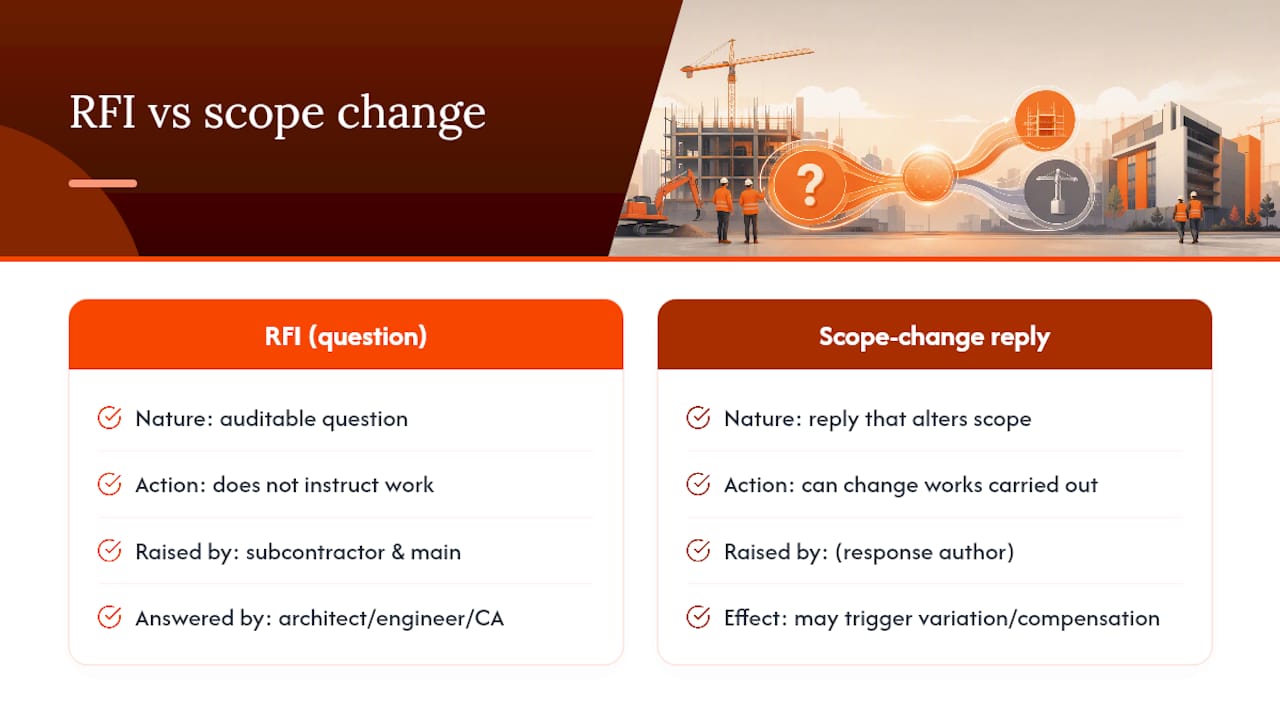
An RFI is auditable communication, not an instruction. It asks a question. It does not tell anyone to do anything differently, and treating it as though it does is one of the more common disputes on site. Subcontractors and main contractors typically raise RFIs; architects, engineers and contract administrators typically answer them.
That distinction has teeth. Under standard forms including JCT, NEC and FIDIC, an RFI is a descriptive industry term rather than a statutory concept, and it is routine rather than exceptional. But a response that changes scope can still trigger a variation or a compensation event, which means the RFI thread often becomes the evidence trail for extensions of time and loss and expense claims later. Get the wording sloppy at the point of asking, and you weaken your own position months down the line when the same paperwork gets pulled apart in a claim.
When should you raise an RFI instead of a variation or submittal?
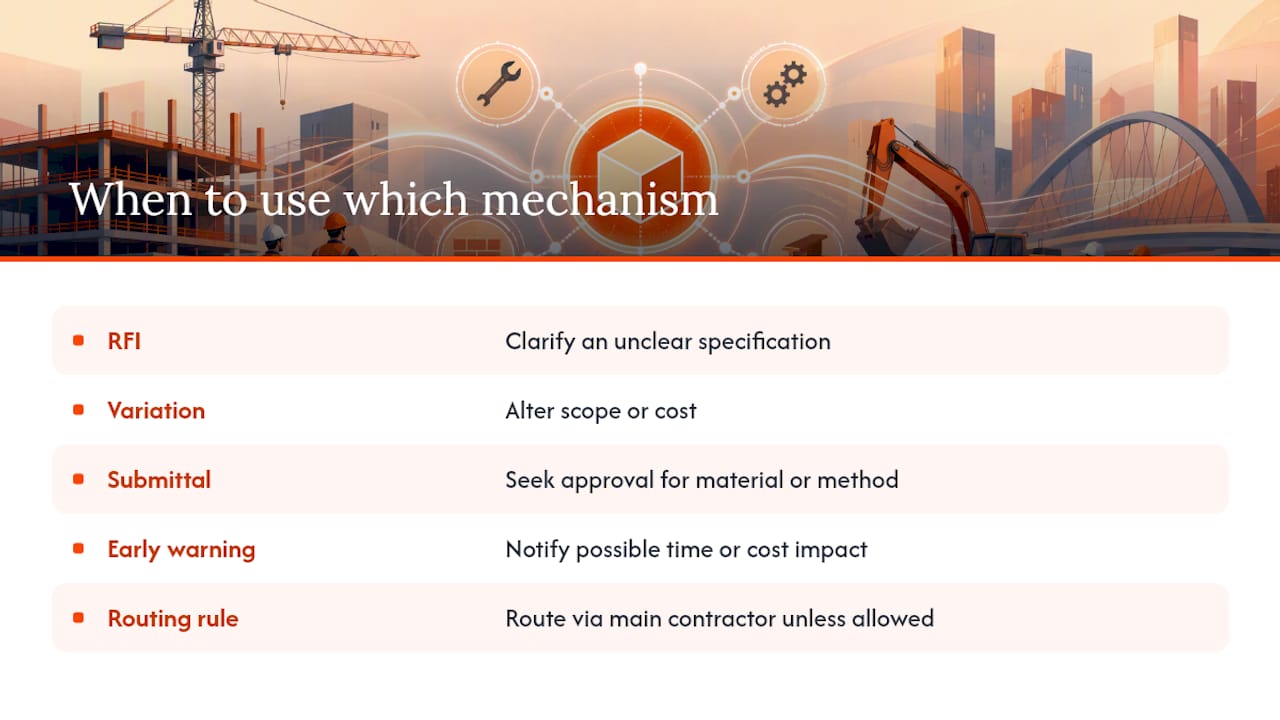
Use an RFI to clarify. Use a variation (or change order, in the American phrasing some software still carries over) to alter scope or cost. Confusing the two causes real damage: teams either wait weeks for an “RFI” that was actually asking permission to do extra work, or they proceed on a variation nobody formally instructed.
A submittal is a different animal again. It asks the design team to approve a specific material, product or method before it goes into the works, whereas an RFI asks for clarification on something already specified but unclear. On NEC contracts, there is a third mechanism to keep separate: the early warning. CECA’s guidance on NEC contracts makes clear that RFIs and technical queries are useful working tools but are not formal NEC processes. If a query might affect time or cost, it should be notified as an early warning, not buried in an RFI log where the Project Manager may never see it in time.
Route RFIs through the main contractor unless the contract explicitly allows direct communication between a subcontractor and the design team. That single rule prevents most of the “who told you that” arguments that follow a badly handled query.
What should an RFI template actually include?
A good RFI answers one question and nothing else. Bundling three issues into one query guarantees a slow, partial answer, because the recipient will address the easy bit and leave the rest hanging.
Your template should carry these fields as a minimum:
- Unique RFI number and date raised
- Submitter name and company
- Exact drawing or specification reference (sheet number, revision, clause)
- One explicit question, written so it can be answered yes, no, or with a specific instruction
- A proposed solution, where you have one
- Priority level (critical, urgent, standard)
- Programme impact if unanswered by the requested date
- Requested reply date
Attach a marked up drawing, a photo, or a rough sketch wherever possible. A designer looking at a clash on-screen with a red circle around it can often confirm a fix in minutes rather than researching the query from scratch.
Here’s what that looks like in practice: “RFI 047, Drawing A-102 Rev C, first floor lobby. Steel beam at grid line D3 clashes with the specified ceiling void by 40mm, see attached photo. Proposed solution: drop the suspended ceiling by 25mm and notch the beam casing by 15mm per the attached sketch. Reply requested by 14 March. Priority: urgent, holding up ceiling grid installation.”
Pro Tip: Write the proposed solution before you write the question. If you can’t propose anything, that’s often a sign the RFI needs splitting into a smaller, more answerable query.
How does the RFI process work from raising to closing?
Most RFI delays happen not because anyone is being difficult, but because nobody owns the middle of the process. The query gets raised cleanly and answered eventually, but the bit in between, where it sits waiting for someone to notice, is where weeks disappear.
The workflow runs in eight steps:
- Identify the issue on site, ideally the same day it’s spotted.
- Prepare the RFI using the template, with one question and a proposed solution.
- Submit it into the agreed project record, not a side channel.
- Triage it against priority and programme impact.
- Review by the contract administrator or design team.
- Reply with a clear answer, referencing the original question number.
- Implement the answer on site and confirm it matches what was asked.
- Close the RFI only once the issue is genuinely resolved.
Accountability sits with different people at different steps. The trade or subbie owns identification and preparation. The main contractor or PM owns submission and triage. The design team owns review and reply. Implementation and closure loop back to site management, who should confirm the fix actually solves the problem before ticking anything off.
Three controls keep this moving:
- A single RFI log that every party can see, rather than parallel spreadsheets.
- Daily or near-daily triage against priority flags, so critical items don’t sit in a queue behind routine ones.
- Escalation triggers, agreed in advance, that specify who gets copied in and when if a reply is overdue, and when an issue should be raised as an NEC early warning instead of left as an RFI.
How fast should an RFI response be, and what do contracts say?
Response-time expectations should scale with risk, not sit at one flat number. A workable benchmark is 24 to 48 hours for critical RFIs that are holding up site work, 3 to 5 days for urgent items, and 5 to 10 days for standard queries that aren’t blocking progress, according to Foundational’s guidance on RFI practice. NEC4 contracts usually set their own reply period in the Contract Data, often two weeks, which is worth checking before you promise a client a faster turnaround than the contract actually requires.
Industry-wide, average RFI response time sits close to 9.7 days, while the best-run projects consistently answer in 3 to 5 days. The gap between those two numbers is almost entirely down to process, not goodwill.
Late replies can have serious consequences and it is important that the RFI log records dates raised, due dates, and dates answered, not just the question and answer text.
- Every RFI needs a timestamp trail, not a verbal “we asked ages ago.”
- On higher-risk buildings, the Building Safety Act’s golden thread requirement means RFIs and any resulting design decisions must be captured and accessible throughout the building’s life, not just for the duration of the contract.
- If a reply changes a specification, that decision needs to be traceable back to the original RFI number.
What best practices actually cut RFI volume and speed answers?
Most of the RFI backlog on a typical job is avoidable, and the fixes aren’t complicated. One question per RFI is the single biggest lever: a query that tries to cover a clash, a spec query and a programme concern in one email will get answered slowly, partially, or not at all.
- Always include a proposed solution and a photo or sketch. It turns the designer’s job from research into confirmation.
- Push for constructability reviews and clash detection during pre-construction. Coordinated design reviews can cut RFI volume by 20 to 40 per cent, which is a lot of admin hours nobody has to spend later.
- Set contractual response deadlines up front, and hold to them with
Pro Tip: If the same type of RFI keeps coming up on a project, that’s not a training problem for the trades, it’s a design coordination gap. Flag it to the design team rather than answering the same question five times.
Why does centralised RFI record-keeping matter more than email?
Email threads and spreadsheets fail at exactly the moment you need them most: when a client, an insurer or an adjudicator asks who knew what, and when. Attachments get lost in reply chains, version control disappears, and nobody can produce a clean audit trail without hours of digging.
A centralised RFI register fixes that by design. It’s searchable, it holds attachments against the right query, it notifies the right person automatically, and it escalates overdue items without anyone needing to remember to chase.
- Fewer duplicate RFIs, because the log shows what’s already been asked.
- Faster response clocks, because priority and due dates are visible rather than buried in an inbox.
- An audit trail that stands up when a claim or a golden thread requirement demands one.
BRCKS was built by a builder with 20 years in the trade, and it automates RFI and variation logs directly from the way teams already communicate, including through WhatsApp. Teams using it report saving 30 or more minutes a day that used to go on chasing paperwork, and subcontractors and clients can be invited in for free rather than paying for extra seats.
What actually works on site, not just on paper
The habit that changes RFI throughput more than any template is timing. Log the query the day you spot the issue, attach a photo, and propose a fix even if you’re not certain it’s right. A tentative answer from site gives the designer something to react to rather than a blank page to research from scratch.
The second habit is cultural: get trades into the routine of proposing solutions, not just flagging problems. A five-minute daily triage catches drift before it becomes a week’s delay.
— James
Centralise your RFIs and site records with BRCKS
BRCKS is the alternative to chasing RFIs across email, WhatsApp and site paperwork separately. It gives you one searchable record instead, so a query raised on site by a subbie lands straight in a shared log, with photos and drawing references attached, and the right person gets notified without anyone typing a reminder.
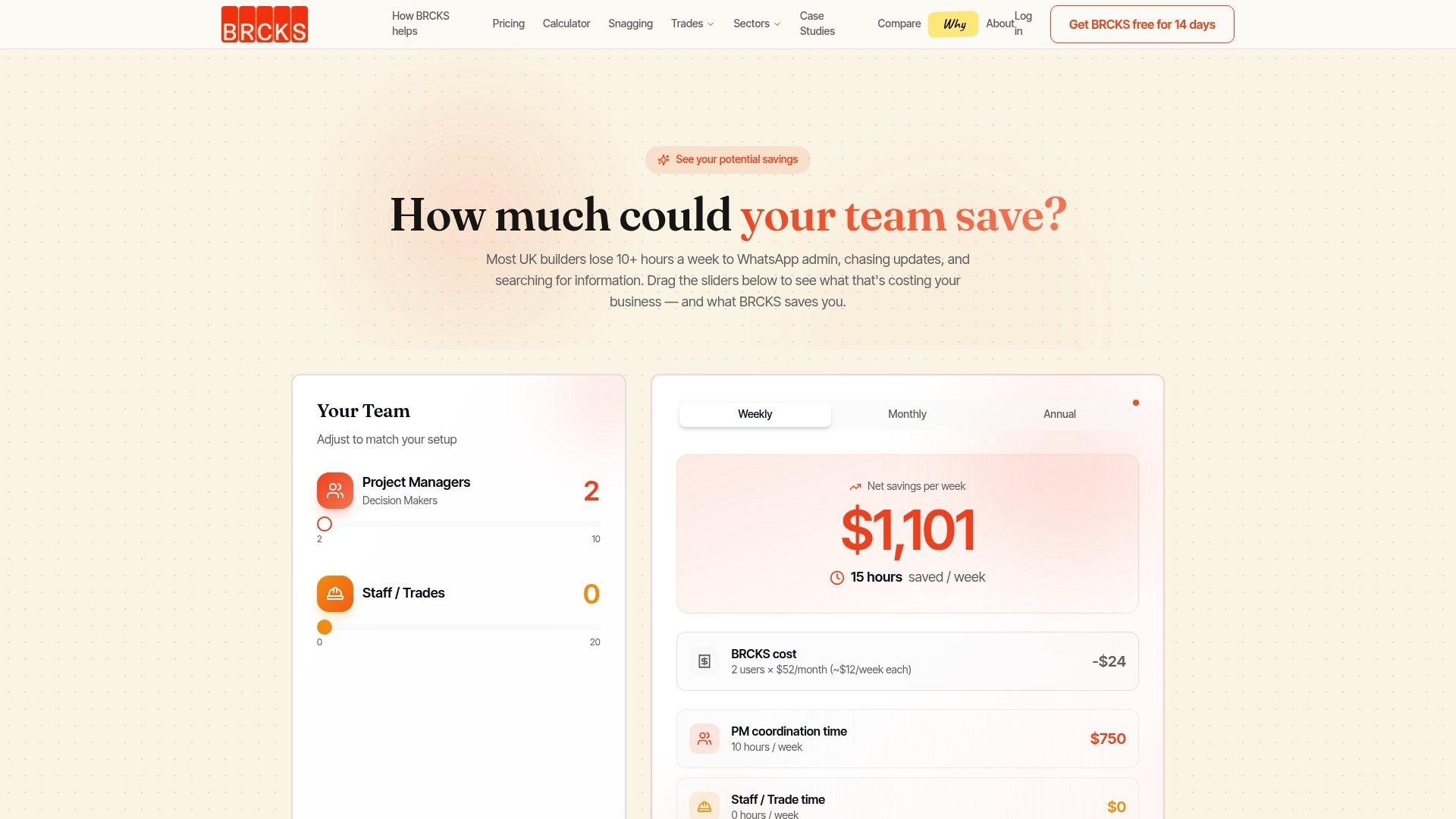
Teams report saving time previously spent hunting through old messages for who said what. Pricing and subscription details are available on the BRCKS website, and the software works alongside the WhatsApp threads your trades already use rather than replacing them. If you want to see how it handles a real RFI log against your own project setup, book a demo or explore the construction software built for builders and try it free for 14 days.
FAQ
What is the purpose of an RFI?
An RFI clarifies missing, ambiguous or conflicting information in the contract documents so work can proceed correctly. It is a question, not an instruction, though its answer can trigger a variation if scope changes.
What is RFI and RFA in construction?
An RFI is a request for information, used to clarify design or specification details. An RFA, request for approval, asks the design team to sign off a specific material, method or submittal before it’s used on site.
How do I prepare an RFI?
Write one clear question tied to a specific drawing or specification reference, propose a solution if you have one, and attach a photo or marked-up sketch. Set a priority level and a requested reply date before submitting it into the project’s shared RFI log.
What does RFI stand for?
RFI stands for request for information. In UK construction it refers to a formal query raised to resolve unclear, missing or conflicting details in contract documents.
Recommended
- RFI vs Submittal: Save 30 Minutes Daily on UK Sites
- Site Communication Workflow: UK Project Manager’s Guide
- Construction Team Onboarding Checklist: 2026 UK Guide
- Top Construction Reporting Tools for UK Sites Compared
How BRCKS Can Help
Adopting a simplified template is a brilliant first step towards eliminating the bottlenecks that stall UK building projects. By integrating these streamlined workflows into BRCKS, your team can automate tracking and ensure that no critical query ever falls through the gaps. Our platform is designed to complement these efficient habits, providing the clarity needed to keep your site moving at pace. We invite you to see how BRCKS can transform your project management by booking a demo or starting a free trial today. Learn more at BRCKS and explore our full feature set.